

Kyrre
Member
I have this uge pivot table sheet. It sorts my workhours- sort by projectnames.
The projectnames is sometimes written wrong in the sourcesheet.
This can be removed and fixed in source-sheet.
However, the pivot don't forget my mistake and still show the removed data as an option.
How can this be removed from the memory of pivot table?
I have updated data.
I have unchecked data in pivot table.
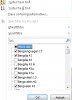
Look into the picture, the checked data is correct, the other is wrong data. I would like to get rid of those.
Is this possible?
The projectnames is sometimes written wrong in the sourcesheet.
This can be removed and fixed in source-sheet.
However, the pivot don't forget my mistake and still show the removed data as an option.
How can this be removed from the memory of pivot table?
I have updated data.
I have unchecked data in pivot table.
Look into the picture, the checked data is correct, the other is wrong data. I would like to get rid of those.
Is this possible?
