Hi all,
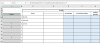
I have this worksheet that tracks trip/meeting attendees. Some choose to use a transfer car some don't. There are two tabs, Attendees and Transfers. If on the Attendees tab, the answer on column F is "Y" for a Guest, then the name of the Guest should populate on the Transfers tab column B, if not, then don't bring the guest name over. I tried a nested if statement but it is duplicating names on the transfers tab since it is testing the same row in multiple cells when pulling the formula down. Any help to make this work would be much appreciated.
I have this worksheet that tracks trip/meeting attendees. Some choose to use a transfer car some don't. There are two tabs, Attendees and Transfers. If on the Attendees tab, the answer on column F is "Y" for a Guest, then the name of the Guest should populate on the Transfers tab column B, if not, then don't bring the guest name over. I tried a nested if statement but it is duplicating names on the transfers tab since it is testing the same row in multiple cells when pulling the formula down. Any help to make this work would be much appreciated.