
I am attempting to get the "% of total" in the column after "Grand Total" in my pivot table. I cannot use a calculated field (at least it hasn't worked yet) and so far this process has been manual.
Here is the issue: this pivot table is a rolling 3-quarter so once another month is thrown in the "% of total" disappears and also as new "parts" are added, the "grand total (or 100%) row has to be moved and the entire "% of total" column re-calculated to reflect the additional item in column A.
Any help would be appreciated. I've uploaded a file as an example. Thanks!
Here is the issue: this pivot table is a rolling 3-quarter so once another month is thrown in the "% of total" disappears and also as new "parts" are added, the "grand total (or 100%) row has to be moved and the entire "% of total" column re-calculated to reflect the additional item in column A.
Any help would be appreciated. I've uploaded a file as an example. Thanks!


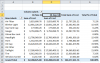

 . They do like the pivot tables because it affords them the advantage of double clicking to get the customer information, etc that makes up the number so the picture link was also not an option. I don't quite understand why tables and charts are needed for every portion of the reporting. Personally, my thought is that "some" of the pivot tables can come out and more information can be added into the charts (such as formulas as legend entries to show increase/decrease % in comparison to previous month and data labels for dollar figures). This would eliminate the pivot tables that (IMO) are unnecessary (3 of the 8), resulting in the possibility of hiding those columns and an easy restructure of the dashboard. I might just try it that way if there are no other options for getting this formula to work. I am not new to excel but also am not familiar with some of the more advanced skills like extensive VBA. My limit to that is recording a macro. I thought that may be a possibility and have been studying up on it without much luck in finding the solution on my own. Guess it's time to start rebuilding!