• Hi All

    Please note that at the Chandoo.org Forums there is Zero Tolerance to Spam

    Post Spam and you Will Be Deleted as a User

    Hui...

  • When starting a new post, to receive a quicker and more targeted answer, Please include a sample file in the initial post.

Personal Macro doesn't open with Excel

WMF

New Member
Hi all,
Another strange thing happened to me...
before it worked totally fine before, suddenly in a day, my personal marco doesn't opened automatically with Excel...

Now, I have to open it from ...\AppData\Roaming\Microsoft\Excel\XLSTART manually when I need my personal macro.

Any hints??
 
Hi, WMF!
Just in case: File tab, Options entry, Trusted Center entry, click on Customize Trusted Center, Trusted Locations entry, and in the big right panel, check the Excel 20XX Default Location: User Start or Startup.
It should point to "C:\Users\<your_user>..." and then all the rest of the path you wrote above.
BTW, you haven't changed of user account, have you?
Regards!
 
Hi both,
Thanks for your suggestions. The path is correct. And I haven't changed user account.
Forgot to mention, I have both Excel 2002 and 2010 in my PC, which always it. Before I can have my Personal Macro with both version.... until one day, it only opens with 2002 but not 2010.
Really has no idea... :(
 
Seems wierd. Try this. Go to the VBA editor window (Alt + F11). Now go to the Immiediate Window (you'll find it under the View menu or use the shortcut Ctrl + G).

In the immediate window type
Code:
 ?application.StartupPath
and see whether the startup path is the same for both Excel 2002 and 2010.
 
I'm using 2002 and 2010 simultaneously and works perfectly fine for me.

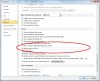
Anyways, try this workaround. In Excel 2010, got to Options (you'll find it in the File tab). Choose Advanced and scroll down to find 'At startup, open all files in'. In the textbox type the location of the startup folder. Click OK, close excel, reopen it and see if it works.

If that doesn't work, try saving a copy of the Personal.xls file in the 2010 format (within the same folder). It should be Personal.xlsm
 

Attachments

  • Excel_Options.jpg
    Excel_Options.jpg
    152.2 KB · Views: 4
Hi SirJB7,
The reason for me having both version is that I have to serve different people with different versions... so many ppl are still using Excel 2003 or even earlier.
 
Why give your self problems by having two versions loaded on the same computer with all the risks in the regedit?
Just save in the version your diffrent people have or set the file extension to .xls in file/save in options.
 
The reason for me having both version is that I have to serve different people with different versions... so many ppl are still using Excel 2003 or even earlier.
Hi, WMF!
If I had to do that and had problems having 2 installed versions, I'd try to virtualize at least one of them; otherwise I'd resign the personal macro workbooks.
Regards!
 
Hi SirJB7, what do you mean by "virtualize"?

Hi bobhc, there are many functions not available in Excel 2003 or before, I need the old version installed to test the functions... (I can't remember which ones are for Excel 2007 or above)...

Anyway, Happy New Year to all of you! :)
 
Hi ,

Have you tried removing your existing Personal macro workbook from the location you manually open it from ( ...\AppData\Roaming\Microsoft\Excel\XLSTART ) , manually record a macro , save it , and then see if this new Personal macro workbook is automatically opened each time you start Excel 2010 ?

If it does , then save your earlier recorded macros in this newly created file.

Narayan
 
Hi, WMF!

Virtualization (https://en.wikipedia.org/wiki/Virtualization) basically lets you run another machine (from full boot to all applications) as a task or application within your main machine, i.e., you can install several "machines" with the same or different OS in your unique physical hardware, and have access to them just alike any other program installed.

Regards!
 
Back
Top