• Hi All

    Please note that at the Chandoo.org Forums there is Zero Tolerance to Spam

    Post Spam and you Will Be Deleted as a User

    Hui...

  • When starting a new post, to receive a quicker and more targeted answer, Please include a sample file in the initial post.

Overlapping Record Count(s) Based on Start Date/Time and End Date/Time

Blanche

New Member
I stumbled upon this thread trying to find a solution to replace a canned report + manual process with a clean MS Excel spreadsheet. I LOVE the solution provided, but my OCD couldn't stop me from comparing the new process results with the old. The counts are so close it makes me question my previous process or the new formula. I've looked and I couldn't find the records which caused the count difference. At this point I feel like I'm looking for a needle in a haystack and was hoping someone had an easier process to see why/where my counts are off.

Previously a report would run for the previous month. I would generate a formula to remove the duplicates. The report gives Record-A that overlaps with Record-B, and also that Record-B overlaps with Record-A, this is manual process 1. Then I would take the resulting not-duplicated records, copy them to a new sheet and perform counts, generate a pivot table and then perform percentages based on total records, this is manual process 2.

The new process is much cleaner; I'm hoping that the issue is with my previous process.

I have attached the spreadsheet which shows last month's records using the old/new format. I greatly appreciate your time and assistance.
 

Attachments

Have You compared Your results and data?
I tried to do this 'my-way' ... and I got something else than You.
You can see my values.
There is a chart, which could give some ideas too.
It's still very rough sample.
 

Attachments

WOW, your results are very different! Unfortunately, my unit automatically disables macros and I was hoping to find a solution that doesn't use them. Thank you for sharing!
 
Again ... Did You compare Your results with Your data?
... or do Your unit will use those Your results somewhere?

... or did You get an idea - why those results are ... different?

I continued testing ... with my own modified file.
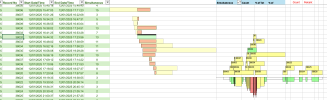
If select eg Record No 38032,
it will show something like below based times:
Green - selected record
Black - overlapped
Yellow - other simultaneous records
Orange - overlaps within those 'yellow' records
Screenshot 2026-01-09 at 13.39.05.png
There could be possible to get something like ... to see the whole datas 'workload'.
 
That is what I still need to do, especially reviewing your example. Thank you very much for your time and effort on this project, I really appreciate it.
 
Still testing ... my found MAX workload seems to be nine (9) ... max nine records in same time.

Which values someone is interesting ... simultaneous or 'workload'?
I found one view to see 'workload' per time - right side of below snapshot
Screenshot 2026-01-09 at 19.04.52.png
Above part shows records per time - green is selected
Below part shows 'workload' - colors & height shows 'workload's ... there are nine (9) records same time in the end of 38032.
Left side shows that there are 13 simultaneous records with 38032.
Which one value (9 or 13) would match with Your needs?
 
Last edited:
Have You find out - what values do You really need to get?
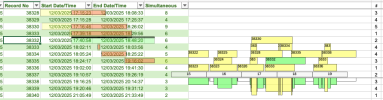
I find one more possible value ... for 38332:
2 ... it tells that while 38332 starts it was second record which runs in same time
( 6 tells that 38332 has overlap with six other records,
2..3..4..5 tells that there were number of records same time (( below hours 15..19))
Screenshot 2026-01-13 at 20.27.53.png
Your solution checks with next record ... hmm?
 
In the attached, on the Record-Data_New sheet (I've hidden columns F:L), there's a new table at cell N1. This table's columns O:R are the same as your table, but column N is an added index to give each row a number, and column S shows the count of other rows the row overlaps with, while column T show the index numbers of those other rows. The results are similar if not perhaps exactly the same as @vletm's.
This is a Power Query solution, there's no macro. Power Query (aka Get & Transform Data on the Data tab) is built-in to your version of Excel.
 

Attachments

Back
Top