Hi All,
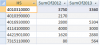
I have two very large data sets, i uploaded a small portion in an excel file.
I do not have an unique identifier as you can see from the 2012 and 2013 data.
But i would like to compare the data as shown in A23:D43 but as i said this data set have thousands of records
Can someone help me automate this process to create this new table that looks like "A23:D43" ?
I am using excel 2013.
Thanks
I have two very large data sets, i uploaded a small portion in an excel file.
I do not have an unique identifier as you can see from the 2012 and 2013 data.
But i would like to compare the data as shown in A23:D43 but as i said this data set have thousands of records
Can someone help me automate this process to create this new table that looks like "A23:D43" ?
I am using excel 2013.
Thanks