• Hi All

    Please note that at the Chandoo.org Forums there is Zero Tolerance to Spam

    Post Spam and you Will Be Deleted as a User

    Hui...

  • When starting a new post, to receive a quicker and more targeted answer, Please include a sample file in the initial post.

Number formatting issue for figures in Lacs

RAtika

New Member
Dear Team,

Whenever user inputs figure as 200000, it should be displayed as 2.0. We had used custom formatting:
#,##0.0,,,ctrlJ%%

we are getting desired output with this formatting. But the problem is when i save the workbook and re-open it then a comma gets deleted automatically & resulting output as 20.0.

Formatting become #,##0.0,,ctrlJ%%.... is there anything am missing.

Pl guide.
Regards,
RS
 

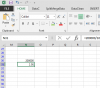
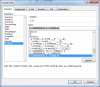
Attachments

Hello Ratika and welcome to the forum...

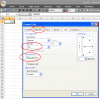
I think you should apply the following settings:
Custom Format for 2.0..PNG

Let us know if its not solved your problem.

Regards,
 
Dear Khalid NGO,
Thanks for ur inputs..I tried the same..
Keeping alignment setting as per your inputs. I get the output but the problem remains the same.
On re-opening the same file, formatting changes!
Comma is getting deleted.
Regards,
RS
 
Dear Khalid NGO,
Thanks for ur inputs..I tried the same..
Keeping alignment setting as per your inputs. I get the output but the problem remains the same.
On re-opening the same file, formatting changes!
Comma is getting deleted.
Regards,
RS

Oops :(
I don't know why this is happening.

Have you tried alternate solution shared in post # 3?
 
We have so multiple sheets and workbooks..we want formatting changes..dividing by 100000 won't be a possible solution for us..
Have u tried to replicate my Issue in ur system..In your system is it getting saved with proper formatting?
 
Hi ,

What I can suggest is that this seems to be a bug ; it might be better not to use it.

Can you not leave your sheets as they are , and create either a new workbook or a mirror set of worksheets , where all your amounts in lakhs are divided by 100000 , so that they are in reality amounts in lakhs ; these cells can then be formatted normally to display correctly. This formatting will be stable and dependable.

Narayan
 
Dear Narayan,

We have almost 20 workbooks consisting 80 sheets..so imagine the rework we'll have to do..

You can suggest some other formatting to get the desired output.
My requirement is to display figures in lacs:

200000 should be displayed as 2.0


Regards
RS
 
Hi Ratika,

try this code. if possible.
Code:
Sub convert()

Dim cell As Range

For Each cell In Range("A1:K20")  '<-- here change your range
If cell.Offset(, 1).Select <> "" Then
If ActiveCell.Value <> "" Then
    If IsNumeric(ActiveCell.Value) Then
        Dim a, b
        a = ActiveCell.Value
        b = a / 10 ^ 5
        ActiveCell.Value = b
    Else: End If
    End If
End If
Next

End Sub
 
Dear Khalid NGO,
Thanks for your inputs.. But the problem here is that there are multiple columns in sheets.. We can't apply formula to each n every sheets.
That is why am looking for custom formatting formula. once n applied for all.
You must have faced this query earlier to convert figures into lacs with one digit after decimal.

Regards,
RS
 
Hi Ratika,
CF can be enhanced across multiple columns in no time.
I am not sure there is any other solution for your question, instead offered above.

I am afraid there is no solution, hope someone will confirm.

Regards,
 
Back
Top