• Hi All

    Please note that at the Chandoo.org Forums there is Zero Tolerance to Spam

    Post Spam and you Will Be Deleted as a User

    Hui...

  • When starting a new post, to receive a quicker and more targeted answer, Please include a sample file in the initial post.

Need currency formatting consistent between userform and worksheet, plus need Excel to sum

Hello,
I thought I figured out how to maintain currency formatting between the userform and the worksheet.

I started with this code
Code:
'Format currency appears AFTER user types in numbers'
Private Sub txtPOAmt_AfterUpdate()
    txtPOAmt = Format(txtPOAmt, "$#,##0.00")
End Sub

But, whenever I saved a row using the userform command button, the Excel worksheet would undo the currency format (despite having the column formatted as currency). So, I kept researching and trying different things. I then added this code to the click event of the Update/Save command button and thought I found the solution.
Code:
txtPOAmt = Format(txtPOAmt, "$#,##0.00")

However, I did a victory dance too soon. Because I have a second worksheet that reports off the first using index/match. When I save a row via the userform command button, the currency formatting transfers from the userform to both worksheets. However, Excel is not including the updated rows in the subtotal calculation. It's as if Excel is reading these as text. To get the column to add correctly, I have to go through the Text to Columns steps.

I tried adding this code to initialization and had no luck.
Code:
txtPOAmt = Format(txtPOAmt, "$#,##0.00")

I've also tried this...
Code:
'***Formats currency appears AFTER user types in numbers...NOT WORKING***
Private Sub FormatCurrency()
Dim sh As Worksheet
Set sh = ThisWorkbook.[Master]
sh.Range("S2:S", "X2:X").NumberFormat = "#,##00.00"
End Sub

I would appreciate the help.
 
Boy, do I understand doing the victory dance too soon (often more than once)! Ok, this is interesting. Let's get specific: What text are you typing into the user form, and what is the user form pasting into the worksheet, and what is displayed on the second worksheet? And I'll be asking what number format you have in all three locations, too. Wait, do user forms have a NumberFormat property? I don't use them enough to be sure.
 
Hi Bob,
I appreciate your quick response.
What text are you typing into the user form
Numbers, i.e., type: 123456 - the userform converts it to $123,456.00
what is the user form pasting into the worksheet,
$123,456.00
what is displayed on the second worksheet
$123,456.00
what number format you have in all three locations
'Master' worksheet column format = Currency
Userform textbox = Currency per code above. I did not do anything to the Properties of the textbox to affect formatting the numbers
'Shipment Report' worksheet column format = Currency

Wait, do user forms have a NumberFormat property
I'm very new to all of this. Not that I'm aware of. I set the format via code, per my examples.

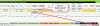
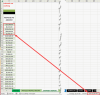
I've attached an image of the 'Shipment Report' worksheet. When I select A5:A9, the sum should be $315,880.00. Instead, it only shows $3,781.00.
 

Attachments

  • Sum not working.png
    Sum not working.png
    48.2 KB · Views: 1
Nicely done (the image, I mean)! My guess is that in converting these numbers to text format, you've made them unavailable as numbers, so the SUM function doesn't know to include them. Like this: You have a number 123456. When you program says
Code:
txtPOAmt = Format(txtPOAmt, "$#,##0.00")
...it produces a text string "$123, 456.00"—a text string that is not a number, although it looks like one to you and me. On the other hand, when you tell Excel that a certain range should be
Code:
....NumberFormat = "#,##00.00"
...that tells Excel to display the numbers in that range using that format. That is, in the former case Excel doesn't see a number, it sees a character string, which it can no more include in a SUM function than it could "Bob Bridges"—but in the latter case Excel still knows it's a number but knows how to display it.

I think what you want to do is avoid the Format function, and use the NumberFormat property, except when you run into special circumstances. I use Format a lot when displaying numbers or dates in a text message, using MsgBox or the like. In Excel ranges, usually NumberFormat is the right way to go.
 
Ok, let me back up and come at it from scratch, one step at a time. Stop me when I say something that isn't completely right:

1) Your program displays a user form that contains a text box. For ease of discussion I'll call that TextA.

2) The operator types "123456" into TextA and ... what? Hits <Enter>? <Tab>? Maybe clicks a button?

3) In TextA the operator now sees ... what? "123456"? "$123, 456.00"? Those are probably the two choices.

4) At this point you expect to see, in a different box (TextB) ... what? Do you want to see "123456" or "$123, 456.00", or something else?

At this point I'll stop and let you catch up with the questions. I'm also going to be asking about the code that either does or does not convert the entered text to the desired format, but first things first. And after that I'll ask about subsequent steps that lead, eventually, to the worksheet where you're not seeing it sum properly.
 
Hi Bob,
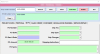
See first image...
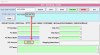
1. User clicks a command button that opens the userform.
2. User enters PO Amt, 123456 in the textbox on the userform and it shows $123,456.00. The user clicks a command button to save and closes the userform
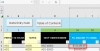
See second image
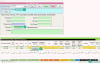
3. User goes to the data worksheet and sees the PO Amt has transferred from the userform to the worksheet as $123,456.00, which 'looks' correct.
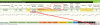
See third image
4. However, on the report worksheet Excel does not recognize the value as a number and does not sum correctly
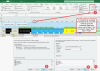
See fourth image
5. To fix this, the user has to go back to the data worksheet, select the column and run through the Text To Table steps
See fifth image
6. The user returns to the report worksheet and the values are summing correctly.

Does this help?
 

Attachments

  • 2023-05-15_10-47-33.png
    2023-05-15_10-47-33.png
    67.4 KB · Views: 0
  • 2023-05-15_10-51-18.png
    2023-05-15_10-51-18.png
    21.7 KB · Views: 0
  • 2023-05-15_10-55-45.png
    2023-05-15_10-55-45.png
    51.2 KB · Views: 0
  • 2023-05-15_10-58-29.png
    2023-05-15_10-58-29.png
    148.7 KB · Views: 0
  • 2023-05-15_11-04-08.png
    2023-05-15_11-04-08.png
    45.2 KB · Views: 0
Yes, and only halfway through your description I'm sure I understand the problem and what needs to happen to fix it. Sorry, but it's what I said the first time. (Although you should feel free to keep arguing with me; maybe I'm still wrong, but I don't think so.)

Let's take it from step 2. The operator hits the keys "123456", and then something else to indicate he's done, maybe <Enter> or something. So at first, that textbox has the value 123456 in it.

But you say that the textbox at that point displays "$123,456.00" to the user. That's because you — well, wait, let me ask instead of telling you. (It's much easier to be humble about such things after being confidently wrong a bunch of times :-).) How did that happen? What you said in your original post is that you changed the value of the textbox to Format(txtPOAmt, "$#,##0.00"); is that still happening? I'm going to assume it is for the rest of this explanation.
So now txtPOAmt is not the number 123456 but the character string "$123,456.00". That looks like a number to a human, but it has lots of non-numeric characters in it, and if you were to ask about IsNumber(txtPOAmt) at that point it would say False, that is, it's not a number.

This is an important distinction, one that you should have clear in your head. Is "ABC" a number? Obviously not, and if you included it in the Excel SUM function it would ignore it. Is "ABC4" a number? Still no. What about "123456Z". Nope, because Excel can't evaluate 'Z' as a numeric character. Well, the same is true of "$123456", and of "123,456". ("123456.00" Excel can deal with, though; it knows what a decimal point is.) So once you convert 123456 to "$123,456.00" you no longer have a number. And when you put "$123,456.00" into a cell in your worksheet, there too it's text and not a number. That's why it's not getting included in your SUM formula.

The simple way to fix this is to a) not convert txtPOAmt to the currency format in the text box. Then you still have a number, and when you put that value into your worksheet it'll be included in the SUM. And there you can b) make sure that the NumborFormat of the cell (or the whole column) is "$#,##0.00", so Excel will display it properly even as it retains 123456 internally.

But you want txtPOAmt to display the currency format too. You can still do that, it just takes a little more work. You have to have two variables, one the numeric value and the other the string equivalent. You save the numeric value in the numeric variable (let's pretend you call that nbrPOAmt), and only then convert txtPOAmt to the currency format, like this:
Code:
'Format currency appears AFTER user types in numbers'
Private Sub txtPOAmt_AfterUpdate()
  nbrPOAmt = txtPOAmt
  txtPOAmt = Format(txtPOAmt, "$#,##0.00")
  End Sub
Back in the main program, you put nbrPOAmt (not txtPOAmt) into the worksheet. Now the text box displays the currency format, and your Excel worksheet has the number internally, but the worksheet displays it as currency too.

One problem: The txtPOAmt_AfterUpdate module has the numeric value nbrPOAmt, but how does it communicate that value back to the main routine? There's probably more than one way to do it, but the first one that occurs to me is to declare nbrPOAmt as a Public variable back in the main routine. Might have to experiment with that.
 
This all makes sense. I'm going to take a stab at your recommendation and will let you know how it goes. Thank you so much Bob for hanging in there with me:)
 
Bob, I believe I have the most important problem solved - to make sure Excel recognizes the data as numbers I added CDbl to the code. Plus, within the worksheet that column is formatted to currency (it always has been).
When the user clicks the Add New command button...
Instead of: Worksheets("Master").Cells(LastRow + 1, 24).Value = txtPOAmt
I have: Worksheets("Master").Cells(LastRow + 1, 24).Value = CDbl(Me.txtPOAmt.Value)[/CODE]

The same goes when the user clicks the Update and Save command button...
Instead of: Cells(sonsat,24).Value = txtPOAmt
I have: Cells(sonsat, 24).Value = CDbl(Me.txtPOAmt.Value)[/CODE]

If I exit the userform and open it back up, the values that appear in the textbox on the userform are numbers without any formatting. But, if you look in the Email Subject Line, it shows the values in txtPOAmt as currency. The email subject line is several textboxes concatenated together.
There is a simple reason the currency appears in the Email Subject Line, but I'm not sure that's as important and it inspired me to look at the 'Search and Display' button code.


When the user opens the userform and searches for an existing order, they click on the Search button. This displays all of the values for that order.
Instead of: txtPOAmt = Worksheets("Master").Cells(i, 24).Value
I have: txtPOAmt = Format(Worksheets("Master").Cells(i, 24).Value, "$#,##0.00")

I still need to include this code for each textbox that represents currency.
Code:
'Format currency appears AFTER user types in numbers'
Private Sub txtCost_AfterUpdate()
    txtCost = Format(txtCost, "$#,##0.00")
End Sub

If you look at Image 2, everything works as it should.
Bob, you helped me get the ducks in line and explain why things were not working. Thank you so much for your help!
I think I might be ok to do a victory dance.
 

Attachments

  • Image 1.png
    Image 1.png
    57.7 KB · Views: 0
  • Image 2.png
    Image 2.png
    118.3 KB · Views: 0
Interesting! I didn't know that the conversion functions (such as CDbl, CInt etc) are capable of translating currency-formatted strings back to numbers. Something for me to keep in mind going forward.

Now let's look at that other thread...
 
Back
Top