Jack-P-Winner
Member
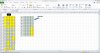
I am trying to do a date sort for 4 digits that are in A3:E407 and place the ones that are the same digits in H3:L407 along with the #1-#5 and when I run the Macro it gives me all the numbers and then they all disappear just as quickly as I can see them
Can anyone tell me what I need to correct please
Thanks in advance
Can anyone tell me what I need to correct please
Thanks in advance
Code:
 Sub ertert()
    With Range("A5").CurrentRegion
        .Columns(.Columns.Count + 1).FormulaR1C1 = "=RC[-5]&RC[-4]&RC[-3]&RC[-2]"
        With .CurrentRegion
            .Sort Key1:=.Cells(1, .Columns.Count), Order1:=xlAscending
        End With
        .Columns(.Columns.Count + 1).ClearContents
    End With
End Sub [CODE]