
I have about 3 pivots that provide different views of the data. I have 3 buttons/shapes in the dashboard. On click of each, I want to the corresponding pivot in a certain "base" location in the dashboard.
I want to create a reusable subroutine that could be used elsewhere in the dashboard to move pivots around.
I thought I could create something like that by creating a sub that takes 2 arguments as shown below and having a Pivot Locations table that stores the location of each of the pivot tables.
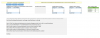
Step 6 is however failing because dashboardPivotLocation is not pointing to cell C6 which is what it was pointing to earlier.
How can I circumvent this?
Also, please suggest if there is a better way to handle this requirement.
Note: What I have provided is a simplified example. The actual dashboard has complex pivots with multiple dimensions and measures coming from a PowerPivot data model. I've tried modifying one base pivot table by adding removing measures on click of buttons but performance of that is slow and that is why I have decided to create multiple pre-built pivot tables and move them around instead on click.
I want to create a reusable subroutine that could be used elsewhere in the dashboard to move pivots around.
I thought I could create something like that by creating a sub that takes 2 arguments as shown below and having a Pivot Locations table that stores the location of each of the pivot tables.
Code:
Sub ShowPivot(dashboardPivotLocation As Range, showPivotName As String)

Dim currentPivotName As String
Dim currentPivotLocation As Range
Dim showPivotLocation As Range

'Step 1: Find Pivot Name at Base Location Range provided.
currentPivotName = dashboardPivotLocation.PivotTable.Name

'Step 2: If currentPivotName <> showPivotName then move on ... Else Do Nothing
    If currentPivotName <> showPivotName Then

        'Step 3: Find Location of currentPivotName from the Pivot Locations Table
        Set currentPivotLocation = ActiveSheet.Range(Application.WorksheetFunction.VLookup(currentPivotName, Range("PivotLocations"), 2, False))

        'Step 4: Move Pivot from dashboard location to location found in Step 3
        dashboardPivotLocation.PivotTable.Location = currentPivotLocation.Address

        'Step 5: Find Location of showPivotName in the Pivot Locations Table
        Set showPivotLocation = ActiveSheet.Range(Application.WorksheetFunction.VLookup(showPivotName, Range("PivotLocations"), 2, False))

        'Step 6: Move pivot found at location from Step 5 to the dashboard pivot location
        '**** This step fails with error because dashboardPivotLocation doesn't point to cell $C$6 anymore ****
        showPivotLocation.PivotTable.Location = dashboardPivotLocation.Address

    End If

End Sub
Step 6 is however failing because dashboardPivotLocation is not pointing to cell C6 which is what it was pointing to earlier.
How can I circumvent this?
Also, please suggest if there is a better way to handle this requirement.
Note: What I have provided is a simplified example. The actual dashboard has complex pivots with multiple dimensions and measures coming from a PowerPivot data model. I've tried modifying one base pivot table by adding removing measures on click of buttons but performance of that is slow and that is why I have decided to create multiple pre-built pivot tables and move them around instead on click.
Attachments
Last edited: