

You are using an out of date browser. It may not display this or other websites correctly.
You should upgrade or use an alternative browser.
You should upgrade or use an alternative browser.
mirror image
- Thread starter Jack-P-Winner
- Start date
NARAYANK991
Excel Ninja
Hi ,
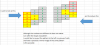
VBA can be used to do this , but you need to specify the meaning of mirror image ; is it a reflection from left to right , or from up to down , or both ? I am not able to understand how what you have shown is a mirror image.
Narayan
VBA can be used to do this , but you need to specify the meaning of mirror image ; is it a reflection from left to right , or from up to down , or both ? I am not able to understand how what you have shown is a mirror image.
Narayan
Jack-P-Winner
Member
I would say both. If you look at this image, imagine folding this over like you were about to told a pc of paper in half. Say you vut this pattern out of paper, fold it and its an exact match once put together
NARAYANK991
Excel Ninja
Hi ,
I am not so sure that it is so simple ; it will depend on how many cells are involved in the image , and how they are located ; will they be contiguous or non-contiguous. Will the input range always be the same shape or can it change ? If yes , then how ?
Secondly , what is the definition of a pattern ?
If you can work out a practical example , and indicate what are the variations possible , that can help.
Narayan
I am not so sure that it is so simple ; it will depend on how many cells are involved in the image , and how they are located ; will they be contiguous or non-contiguous. Will the input range always be the same shape or can it change ? If yes , then how ?
Secondly , what is the definition of a pattern ?
If you can work out a practical example , and indicate what are the variations possible , that can help.
Narayan
Jack-P-Winner
Member
Hmm, this is an example. I have several spreadsheets with 4 columns of numbers. I would
Ike to be able to say copy up to 20 rows and paste them on a separate sheet Once pasted produce a mirror image of what I pasted. It can have options as to how the mirror looks Some will be 8 rows 4 coulombs, done 12 rows 4 columns and so on but always 4 columns. The pattern is the different groups f rows and columns n a number sequence. In this example the number sequence is the 2's on the image to the right far left side match the image to the left far right 6"s the group of 2 numbers (6,5,4) match the group of numbers (2,3,4). The group of numbers (7,8) match the (9,1) On this example all these numbers match a mirror image as a hmm.... Picture type pattern. They LOOK alike in a pattern The numbers are not important. How the image as a whole is .... Is what matters. I can give other examples if you like?
Ike to be able to say copy up to 20 rows and paste them on a separate sheet Once pasted produce a mirror image of what I pasted. It can have options as to how the mirror looks Some will be 8 rows 4 coulombs, done 12 rows 4 columns and so on but always 4 columns. The pattern is the different groups f rows and columns n a number sequence. In this example the number sequence is the 2's on the image to the right far left side match the image to the left far right 6"s the group of 2 numbers (6,5,4) match the group of numbers (2,3,4). The group of numbers (7,8) match the (9,1) On this example all these numbers match a mirror image as a hmm.... Picture type pattern. They LOOK alike in a pattern The numbers are not important. How the image as a whole is .... Is what matters. I can give other examples if you like?

SirJB7
Excel Rōnin
Hi, Jack-P-Winner!
Give a look at the uploaded file. This is the code, which works on the selected range:
Regards!
Give a look at the uploaded file. This is the code, which works on the selected range:
Code:
Option Explicit

Sub JackPWinnerIWant15PercentOfJackpot()
    ' constants
    Const ksoutput = "L5"
    ' declarations
    Dim rngI As Range, rngO As Range
    Dim I As Long, J As Integer
    ' start
    Set rngI = Selection
    Set rngO = ActiveSheet.Range(ksoutput)
    ' process
    With rngI
        For I = 1 To .Columns.Count
            .Columns(I).Copy rngO.Offset(0, .Columns.Count - I)
        Next I
    End With
    ' end
    Set rngO = Nothing
    Set rngI = Nothing
    Beep
End SubAttachments
Jack-P-Winner
Member
I PROMISE i will NOT forget those that have helped me. My goal is once I hit a major jackpot I want to give out numbers to a few select ppl that have touched my heart and helped me a long the way. You sir are already on my list with 3 others from this forum and my list is small (-: thank you for your help. When I get home I will check this out. Am iPhone and iPad suck for this stuff. Lol. Hopefully I can unprotect my sheets. The main reason to unprotect them besides being able to add to my code is the ability to copy and paste the Patterms. I'm having to rewrite them and I make mistakes :-( Only human. Ive berm working on this code for over a year and when I see something new I add to it
SirJB7
Excel Rōnin


Jack-P-Winner
Member
I wasn't (-:
Jack-P-Winner
Member
Hi, Jack-P-Winner!
Give a look at the uploaded file. This is the code, which works on the selected range:
Regards!Code:Option Explicit Sub JackPWinnerIWant15PercentOfJackpot() ' constants Const ksoutput = "L5" ' declarations Dim rngI As Range, rngO As Range Dim I As Long, J As Integer ' start Set rngI = Selection Set rngO = ActiveSheet.Range(ksoutput) ' process With rngI For I = 1 To .Columns.Count .Columns(I).Copy rngO.Offset(0, .Columns.Count - I) Next I End With ' end Set rngO = Nothing Set rngI = Nothing Beep End Sub
I do not know what to do with this file. When I open it, it has 3 pages. One with a lot of formulas and two sheets empty. Can you give me some instructions?
SirJB7
Excel Rōnin
Hi, Jack-P-Winner!
The 3 worksheets are the default for a new workbook. 2nd and 3rd are empty. 1st one has this formula for range A1:J50 :
="row."&FILA()&"_col."&COLUMNA() -----> in english: ="row."&ROW()&"_col."&COLUMN()
just for filling with random data; I added some formats to check proper functioning.
The only thing that matters is the posted code, which operates on the selected range of active sheet, i.e., you select anything, you run the macro and that anything gets mirrored at L5 cell (change it as you want).
Regards!
The 3 worksheets are the default for a new workbook. 2nd and 3rd are empty. 1st one has this formula for range A1:J50 :
="row."&FILA()&"_col."&COLUMNA() -----> in english: ="row."&ROW()&"_col."&COLUMN()
just for filling with random data; I added some formats to check proper functioning.
The only thing that matters is the posted code, which operates on the selected range of active sheet, i.e., you select anything, you run the macro and that anything gets mirrored at L5 cell (change it as you want).
Regards!
Jack-P-Winner
Member
I am on my iphone ): but will be home shortly. Are you saying to take sheet one and use that in my module as a macro to run OR hide this code and place my data I want to mirror image in cells ?????
Jack-P-Winner
Member
Just got home. Long day. I will check this out and thanks. I'm really looking for a mirror of say 10 to 20 rows above or below. I will show you an example
Jack-P-Winner
Member
It is kind of hard to explain what I am looking for but I will try. I try to kind of look into a crystal ball in the future with what pattern (image may be coming up using my different tools. If you look at this you may see what I am looking for when I say mirror image. I guess I was hoping to put a group of numbers in cells say in columns ABCD rows up to 1,2,3,4,5,6,7,8,9,- 20 like the attached and it produce a mirror image of whatever I put in them. If I place say a set like one of the Tees. I want this program to produce a mirror image of a TEE. The purpose is sometimes the colors get so jumbled up I have a hard time looking into my crystal ball but if I can put a pattern in a program it will produce this image for me to play around with. Hope this makes sense. I am not looking to find or LOOK anything through rows and rows of information. Basically if you put a picture of this pattern up to a mirror it will see the reverse image
Attachments

NARAYANK991
Excel Ninja
Hi ,
It is easy for a human to process the shape , and say that it looks like a T ! I doubt that when coding in VBA we can do it so easily !
Two doubts :
1. Will you always be looking for a T ? Also , will the leg of the T be two cells while the top of the T is 4 cells ?
2. Does it matter that the leg of the T has identical values while the top of the T also has identical cells ? What I mean is , is it fixed that the T is formed only when the cells all have the same values ?
3. Lastly , who decides what is a T ? According to me , we can form a T from the 1s and the 9s in cells I4 , I5 , I6 and I7 , and in cells H5 and H6.
Narayan
It is easy for a human to process the shape , and say that it looks like a T ! I doubt that when coding in VBA we can do it so easily !
Two doubts :
1. Will you always be looking for a T ? Also , will the leg of the T be two cells while the top of the T is 4 cells ?
2. Does it matter that the leg of the T has identical values while the top of the T also has identical cells ? What I mean is , is it fixed that the T is formed only when the cells all have the same values ?
3. Lastly , who decides what is a T ? According to me , we can form a T from the 1s and the 9s in cells I4 , I5 , I6 and I7 , and in cells H5 and H6.
Narayan
Jack-P-Winner
Member
actually the numbers in the cells do not mean a thing at this stage I will not only look for patterns like a TEE but other images like the If you look at the eight 8's under columns I and G is another similar pattern I would look for. The more I think about this it Ma be impossible to describe on a forum what I'm looking for lol
Last edited:
SirJB7
Excel Rōnin
Hi, Jack-P-Winner!I will not only look for patterns like a TEE but other images like the If you look at the eight 8's under columns I and G is another similar pattern I would look for. The more I think about this it Ma be impossible to describe on a forum what I'm looking for lol
I absolutely agree. And shapes/pattern recognition isn't simply at all, as a tip it's been one of the problems (and it was a simple square) in the Facebook Hacker Cup 2014 Qualification Round:
https://www.facebook.com/hackercup/problems.php?pid=318555664954399&round=598486203541358
So you'd better analyze thoroughly what you're trying to do, then try to put it in plain English for non Excel skilled nor gambler guys, and if you succeed post it here. But take care of:
a) From Groucho: "A child of five would understand this. Send someone to fetch a child of five."
b) From Einstein & Feynmann:
http://chandoo.org/forum/threads/di...d-on-department-performance.14036/#post-83186
Regards!