• Hi All

    Please note that at the Chandoo.org Forums there is Zero Tolerance to Spam

    Post Spam and you Will Be Deleted as a User

    Hui...

  • When starting a new post, to receive a quicker and more targeted answer, Please include a sample file in the initial post.

Is it possible to set 2 columns from a sheet password protected.

Jagdev Singh

Active Member
Hi Experts

Is it possible to set 2 columns from the sheet password protected. Whenever a user try to change the value it should ask for password.

I am following the below process..

You can select a whole column, then go to Format/Cells and then the protection tab, and tick to protect them. Then go to Tools, protection and protect sheet to apply protection.

It just inform that the sheet is protected, unprotect it. It is not prompting for password.

Regards,
JD
 
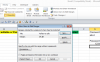
When you go to protect the sheet, you need to type in the password you want it to use.
upload_2015-2-10_9-54-52.png
 
Hi Luke,

Thanks for the info. I followed the above procedure, is this the only way to password protect the columns. When I am trying to change the data it is throwing an error msg that the sheet is unprotected and change the setting to make the amendment. Is there a way where it prompt with the pop-up to enter the pass-word instead of this msg.

I just want to know is this possible or not?

Regards,
JD
 
Ah, I think I understand now. Thankfully, the answer is yes.
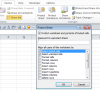
Close to the previous button, hit the "Allow users to edit ranges" button
upload_2015-2-11_9-31-29.png

You can create new defined ranges, and set a password for each range. Then, protect the whole sheet (note that you can use a different password). The attached provides a sample of how this setup works.
 

Attachments

Hi Luke
I am able to set a column password protected, but when I locked the sheet, it doesn’t allow me to add or modify data in rest of the columns. I do not know what I am doing wrong here.
1. I am setting the Allow user to edit ranges option for column A
2. After setting the password I am protecting the sheet.
Please let me know if I am doing something wrong here.

In the attached file in sheet1 (RawData) I need to set Column A and Column D password protected and rest of the columns should be unprotected and users can able to add or modify it.
Regards,
JD
 

Attachments

Hi JD,

When we are done, we're going to need to have the worksheet protected. This is a given. Now, there are three types of cells you will have at the end:

A) Cells that anyone can edit - These cells will need to be formatted to be unlocked, so that when we protect the sheet, nothing happens to them

B) Cells that no one can edit - These cells will need to be formatted to be locked (which is the default)

C) Cells that you can edit with password - These cells need to be formatted to be protected, but you will setup the "Allow Users to Edit Range" tool so that they can over-ride the protection, if needed.

The three types of columns are highlighted in the workbook I uploaded. It sounds like you have cells fitting category A, but you didn't format them to be unlocked before protecting the sheet.

@Marc L :DD
 
Back
Top