Hi everyone!
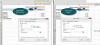
I have two identical workbooks. Every workbook contain fields with data validation, and settings in that fields are (Validation criteria):
Allow: List;
Source: =List_1;
"Ignore blank" is marked;
"In-cell dropdown" is marked.
But, one workbook shows in-cell dropdown, second workbook - doesn't show (data validation works - I cannot input wrong data, but I cannot CHOOSE it from dropdown list).
This makes me crazy as settings are the same...
Also, two workbooks have different color schemes, and when I change "Themes" in second workbook, changes are not applied. Maybe this is connected...
Please take a look - maybe someone can assist in this issue!
BR,
Katerina
I have two identical workbooks. Every workbook contain fields with data validation, and settings in that fields are (Validation criteria):
Allow: List;
Source: =List_1;
"Ignore blank" is marked;
"In-cell dropdown" is marked.
But, one workbook shows in-cell dropdown, second workbook - doesn't show (data validation works - I cannot input wrong data, but I cannot CHOOSE it from dropdown list).
This makes me crazy as settings are the same...
Also, two workbooks have different color schemes, and when I change "Themes" in second workbook, changes are not applied. Maybe this is connected...
Please take a look - maybe someone can assist in this issue!
BR,
Katerina