• Hi All

    Please note that at the Chandoo.org Forums there is Zero Tolerance to Spam

    Post Spam and you Will Be Deleted as a User

    Hui...

  • When starting a new post, to receive a quicker and more targeted answer, Please include a sample file in the initial post.

If with Loop

KishorKK

Member
Hi Friends,

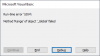
when i am executing this one i'm getting error,

Code:
Sub loops_if2()

Dim marks As Integer

    For marks = 1 To Range("myloopcount").Value

    If Cells(marks + 1, "b").Value >= 40 Then

    Cells(marks + 1, "c").Value = "Pass"

    Else

    Cells(marks + 1, "c").Value = "Fail"

End If

Next marks

End Sub
can some one explain me

upload_2016-12-2_12-24-27.png
 
Last edited by a moderator:
then how to write suggest
Was going to edit previous post but opted for deleting it...

Since you are looping until last row maybe something like
Code:
Sub loops_if2()

Dim marks As Integer


    For marks = 1 To Columns("B").Cells(Rows.Count).End(xlUp).Row - 1
   
    If Cells(marks + 1, "b").Value >= 40 Then

    Cells(marks + 1, "c").Value = "Pass"
   
    'MsgBox Cells(marks + 1, "c").Value & " Pass," & " and his marks is " & Cells(marks + 1, "b").Value

    Else

    Cells(marks + 1, "c").Value = "Fail"

End If

Next marks

End Sub
 
this one i got , so we cannot write


I have few questions here why we need to write

marks+1, i am not getting this "Range("myloopcount").Value"
 
this one i got , so we cannot write


I have few questions here why we need to write

marks+1, i am not getting this "Range("myloopcount").Value"
Well, I would write it differently but in any case...

"marks + 1" because you have "marks" starting at 1 and the first row you want to evaluate is 2 so 1+1 (you could just replace with "For marks = 2 to Columns("B").Cells(Rows.Count).End(xlUp).Row" and use just "marks" instead of "marks + 1":
Code:
Sub loops_if2()

Dim marks As Integer


    For marks = 2 To Columns("B").Cells(Rows.Count).End(xlUp).Row
 
    If Cells(marks, "b").Value >= 40 Then

    Cells(marks, "c").Value = "Pass"
 
    'MsgBox Cells(marks, "c").Value & " Pass," & " and his marks is " & Cells(marks, "b").Value

    Else

    Cells(marks, "c").Value = "Fail"

End If

Next marks

End Sub

"Range("myloopcount").Value" refers to a named range called "myloopcount" where you would have the number of the last row of the range you are evaluating... in this case it would be "8" (probably a formula to determine this, making it dynamic). Since you don't have any range named "myloopcount" you can't use it. Other solution would be to name some cell "myloopcount" and use a count formula there to return the number of the last row of your range.
 
Back
Top