• Hi All

    Please note that at the Chandoo.org Forums there is Zero Tolerance to Spam

    Post Spam and you Will Be Deleted as a User

    Hui...

  • When starting a new post, to receive a quicker and more targeted answer, Please include a sample file in the initial post.

If formula help

fireguy

New Member
My cell O6 has 4 values, strong, high, moderate and weak. I enter strong in O6 I can get cell p6 to show 12 (using the formula below) and I can get the others to work by themselves but not together.


I would like to have one formula in cell p6 to enter the value (12, 9, 6 or 0) of the word, selected from O6 which I have a drop down menu for the 4 choices


=IF(ISNUMBER(SEARCH("strong",O6)),"12","")
=IF(ISNUMBER(SEARCH("high",O6)),"9","")
=IF(ISNUMBER(SEARCH("moderate",O6)),"6","")
=IF(ISNUMBER(SEARCH("weak",O6)),"0","")


Rick
 
If you really want it all in one formula, you could do:
=LOOKUP(B6,{"High","Moderate","Strong","Weak"},{9,6,12,0})

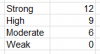
However, I would not suggest this. Instead, make a short table showing your inputs/outputs:
upload_2015-2-2_13-13-8.png
and then you could use a formual like:
=VLOOKUP(B6,C2:C5,2,FALSE)
Advantage here is that you don't have to look in the formula to see what values you wanted, and it's easy to change inputs/outputs if needed.
 
If you really want it all in one formula, you could do:
=LOOKUP(B6,{"High","Moderate","Strong","Weak"},{9,6,12,0})

However, I would not suggest this. Instead, make a short table showing your inputs/outputs:
View attachment 15392
and then you could use a formual like:
=VLOOKUP(B6,C2:C5,2,FALSE)
Advantage here is that you don't have to look in the formula to see what values you wanted, and it's easy to change inputs/outputs if needed.
I entered the =lookup formula and it works great but if I don't have value in B6 I get #N/A in the cell looking for value. Do we need to enter something at the end to stop the #N/A from showing?
 
Hi Rick,
You can wrap Sir Luke's formulas with IF statement to first check the cell then proceed for result:

=IF(ISBLANK(B6),"No Data",LOOKUP(B6,{"High","Moderate","Strong","Weak"},{9,6,12,0}))

=IF(ISBLANK(B6),"No Data",VLOOKUP(B6,B2:C5,2,FALSE))

Or slight update in Sir Bob's solution:
=IFERROR(VLOOKUP(B6,B2:C5,2,FALSE),"No Data")

IFERROR will also work if you enter numeric data in B6

Regards,
 
Back
Top