Creative carla
New Member
How can I save with individual file name a data from data validation list.
my data validation list is in J8
my data validation list is in J8


Sure thing. Sorry, just stressing because of the amount of work.can you provide a sample, not sure i understand the question, also as this is a free voluntary forum, i would allow more than 3 minutes for an answer - for me more like 24hours - but the mods my disagree with the timescale , but personally , i may read a question and not respond for a while.
infact it may take 5-10mins for me to get notified of a new thread in the forum, and then its when i get around to reading that email.
Hopefully. Thanksok, you will need VBA to cycle through all the dropdown list and save each one as a separate named PDF, VBA is not something i provide solutions on anymore, as i'm very out of date now
Sorry - hopefully another member will be able to assist
Creative carla
Where comes that J8-list?
... or have You really wrote there 1000 ids?
What should save by PDF?
... or only that cell's J8 value?
You should able to send a sample Excel-file and one expected PDF here.
Creative carla
Could You reply those my questions?
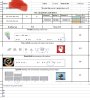
You sent a jpg-file - a picture. It's a challenge to write any code for Your sent picture.
J8 is unique identifier ID- I inserted as drop down list.
Each drop down should save as pdf
This is my excel file and pdf should look like this
Creative carla
There is none data validation ... drop down in cell I8.
wow! how do I do this? how should i copy and put it in different excel file with the same data
is it also possible to for the file name to be the "name" instead of the ID?
Creative carla
Your how ...
... copy and paste Your used all data to my sent file and use it
Your ID > name ...
... did You mention it before?
... are names unique?
... it's possible do modify
Ps If You'll have 1000 people in Your list ... then those PDFs should save in own folder too.
Ps Your used pictures sizes were huge ... test this version.
Hi, sorry... i am new to all this and I get too excited checking the file...but yeah...my bad for missing out on my appreciationCreative carla
Please pay attention, it does not offer you a better solution than what was presented to you, and despite all this, I did not see any pressure from you to like,,,thanks alot mr. vletm
Creative carla
Manually create a folder called PDF in the same folder as this file.
Names will use for PDF's names.