
You are using an out of date browser. It may not display this or other websites correctly.
You should upgrade or use an alternative browser.
You should upgrade or use an alternative browser.
How to use Count formula?
- Thread starter Kutty
- Start date


Khalid NGO
Excel Ninja

Kutty
Member
Thanks @Khalid NGO 
Khalid NGO
Excel Ninja
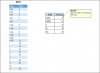
Hi,some excel files have only one criteria_range and some other excel file have more than one criteria_range. so I confused instead of that ...
View attachment 24831
Unnecessary confusion here.
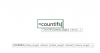
Just type =COUNTIFS(
now press and hold Comma ","
you will see the difference.
criteria_range and criteria are separated by Comma.
Regards,
Kutty
Member
Thank you @Khalid NGO