• Hi All

    Please note that at the Chandoo.org Forums there is Zero Tolerance to Spam

    Post Spam and you Will Be Deleted as a User

    Hui...

  • When starting a new post, to receive a quicker and more targeted answer, Please include a sample file in the initial post.

How to export 'received dates' when exporting emails from Outlook into Excel

jennifer8

New Member
Hi
I need to count emails exported from Outlook, into Excel and work out the number of days between receipt and response. But when I export or paste the emails into Excel, the emails with a recent receipt date, do not paste the Receipt date fully into Excel, rather they paste in the following format "Mon 07:31". I would like the date to be exported so I can use it in Excel, for example "22/05/2015", but I can't seem to get it to work.
Any help gratefully received - thanks!
 
Hi jennifer8, and welcome to the forum!

How are you currently exporting the emails?
 
Hi Luke,
I've tried simply copy and pasting into Excel and also using the export function in Outlook. The copy and paste doesn't copy the full received date and the export function doesn't have received date as an export field. I have tried importing through Access, which brings through through the date function just fine, but won't bring through the categories we use on the emails. Any ideas?
 
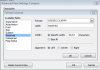
I'd go with the Copy method. Before you copy, right-click on the fields, go to 'View Settings'. Go to 'Format Columns'. Then, select the columns with dates in them and change the format to be something simpler, like
m/d/yyyy h:mm AM/PM

upload_2015-6-9_15-29-22.png


That way, when you copy/paste into XL, it will handle the data better and keep all the time and date info correctly.
 
Hi Luke, I've tried that, but the most recent messages, those from the same day or one or two days after, despite showing as the full date format, will only paste into Excel as "Mon 07:31". I can't seem to get the date format to stay as viewed in Outlook.
 
Strange. Can you post a small screenshot of how it looks in your Outlook before copying, and what it looks like when you paste into XL?
 
Back
Top