• Hi All

    Please note that at the Chandoo.org Forums there is Zero Tolerance to Spam

    Post Spam and you Will Be Deleted as a User

    Hui...

  • When starting a new post, to receive a quicker and more targeted answer, Please include a sample file in the initial post.

How do I count all cells that contain a date in the current week/month?

Bob Harper

New Member
I have an excel sheet that tracks my new sales. Each row represents a new sale and is dated based on their first order with me. I would like a formula that would count all the new sales dated in the current week, and another to count all the sales for the current month. I looked at doing a date range but I don't want to have the change the date range in the formula every week/month. Thanks in advance!
 
You could use a Pivot Table and group dates per month and week.
To do so right click the date range in the PT - Select "Group" - Select by " Months" and by " Days and for the latter enter the number of days ( 7 )
 
Row Labels
Group1
5/2/2014
5/6/2014
5/13/2014
5/14/2014
5/15/2014
5/20/2014
5/21/2014
5/22/2014
(blank)
Grand Total

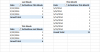
This is what my pivot table looks like. I know that I did something wrong. I don't really understand how pivot tables work, or how to make it count the dates. Sorry that I am so slow with this. Do you know what I did wrong?
 
I basically did what you guys recommended. I ended up creating 3 pivot tables to count my new accounts for this week, last week, and for the month (image attached). But there is one more thing that isn't working properly yet, so I guess I am not as smart as I thought I was.

I noticed that as I add new accounts to my spreadsheet the pivot tables do not update. Is there any way to have them automatically update as I add new information?
 

Attachments

  • Pivot Tables for Activations.png
    Pivot Tables for Activations.png
    13 KB · Views: 11
Good day Bob

If you're using tables, not quite sure why you need to go as far as a pivot table which is designed to crunch huge amounts of data.......but right click on a field in a pivot and select.....Pivot table Options > Data > and choose Refresh data when opening file.
 
Hi,

Thank you for the help with the refresh button on the pivot tables. That will work.

Originally, I was looking for a formula that would count all the dates that were in the current week. I decided to try and figure out the pivot table thing based on a reply on this thread. Is there a formula like that? Like a countifs for the current week or something? Thanks again!
 
Hi Bob ,

The COUNTIF(S) functions will not work with the WEEKNUM function operating on a range of dates ; what you can do is determine the start of the current week ( the Sunday falling within the current week ) and then take that date and the date 6 days from that date to get the current week.

Thus , a formula such as :

=COUNTIFS(Dates_Range,">="&(TODAY()-WEEKDAY(TODAY())+1),Dates_Range,"<="&(TODAY()-WEEKDAY(TODAY())+7))

will return the number of dates within your Dates_Range , which fall in the current week.

Narayan
 
Good day Narayan

I was just thinking that with a smallish amount of data a pivot table is a sledgehammer to crack a nut. With a table a filter can be applied very quickly to any column, and if an auto sum is applied to the table it will grow and shrink with the filtered table. You can get the totals by just filtering the dates within the current week.


p.s how's the student help going?


.
 

Attachments

Hi Bob ,

The problem is that the AutoFilter is totally manual , in that the selection of last week has to be done manually. Any reference date that is supplied has to be an absolute date and cannot be a cell reference.

If you can do things manually , then the AutoFilter is very convenient ; the Advanced Filter is convenient and also more powerful.

Regarding student help , no student seems to need help !

Narayan
 
Back
Top