Hi all
I ran into a problem
I got a Userform width 10 CheckBoxes bx1 to bx10 to hide/unhide columns A to J
When i open the Userform i check in Initialize module if a column is hidden or not
im using this vba-code to check/uncheck bx1-bx10 :
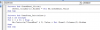
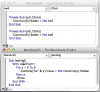
For t = 1 To 10
Me.Controls("bx" & t).Value = Not Sheets("Timeindtastning").Columns(t).Hidden
Next
Problem is :
If I open Userform and hide say. column(5) "E" / bx5
Then close Userform and reopen, for som reason column 5 is unhidden even bx5 still is unchecked
What goes wrong and what to do
regards Poul
I ran into a problem
I got a Userform width 10 CheckBoxes bx1 to bx10 to hide/unhide columns A to J
When i open the Userform i check in Initialize module if a column is hidden or not
im using this vba-code to check/uncheck bx1-bx10 :
For t = 1 To 10
Me.Controls("bx" & t).Value = Not Sheets("Timeindtastning").Columns(t).Hidden
Next
Problem is :
If I open Userform and hide say. column(5) "E" / bx5
Then close Userform and reopen, for som reason column 5 is unhidden even bx5 still is unchecked
What goes wrong and what to do
regards Poul