• Hi All

    Please note that at the Chandoo.org Forums there is Zero Tolerance to Spam

    Post Spam and you Will Be Deleted as a User

    Hui...

  • When starting a new post, to receive a quicker and more targeted answer, Please include a sample file in the initial post.

Hide certain worksheet tabs?

dmrubin

New Member
I see many posts that deal with hiding/unhiding sheets using various techniques. I haven't seen anything that deals with hiding some tabs, but not others. I have a workbook that allows users to add worksheets, and these are the only tabs I would like them to be able to see. The initial 7 worksheet tabs should remain hidden. Any assistance or direction to a previous post would be appreciated.

David
 
Hi,

Use a code like

Code:
'To Hide
Sheets("Sheet1").Visible = xlVeryHidden
 
'To Unhide
Sheets("Sheet1").Visible = xlSheetVisible
 
Thanks for the quick reply, Sathish. But I don't want to hide the sheets, just the tabs. Any variation on the code that will work?

David
 
Tabs are part of the sheet!!
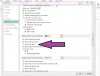
I have macros that take the user from sheet to sheet, so they are not hidden. I just don't want the tab to appear. If you hide the sheet tabs in the Advanced portion of the Options menu, the sheets themselves are not hidden. This is what I want, but only for certain sheets.
 
ZA010282232.jpg


upload_2014-8-18_18-8-59.jpeg


.
 
The short answer is, you can't. As bobhc has pointed out, you can toggle an option to not show any sheet tabs. But, you can't show some tabs, and not show others.

If you have a macro that takes the user from sheet to sheet, I would use the macro then to hide/unhide the sheet.
 
Back
Top