skyh3ck
Member
Hello Friends
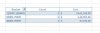
In the attaached sheet i want to count column A based on criteria in columb f
$60,000-$79,999
$80,000-$99,999
$100,000-$124,999
$125,000+
I want to count column A cell that fall on above category and also want to get Sum of cells that fall in that category
i know it has to be CountIF and SumIF formulae but dont no how can i get desired result
Thanks in advance
In the attaached sheet i want to count column A based on criteria in columb f
$60,000-$79,999
$80,000-$99,999
$100,000-$124,999
$125,000+
I want to count column A cell that fall on above category and also want to get Sum of cells that fall in that category
i know it has to be CountIF and SumIF formulae but dont no how can i get desired result
Thanks in advance