• Hi All

    Please note that at the Chandoo.org Forums there is Zero Tolerance to Spam

    Post Spam and you Will Be Deleted as a User

    Hui...

  • When starting a new post, to receive a quicker and more targeted answer, Please include a sample file in the initial post.

Group Dates by GL (General Ledger) Calendar

David McCloskey

New Member
I have an ODBC connection to our MRP system that pulls transactions with a date field. I currently have them grouped by month, but I need to group by our GL calendar. Example: October 2015 starts on 10/5 and ends 10/31. For financial people, we're on a 4/4/5 calendar. Is there a way to group based on a custom list or range?
 
Sorry, new to the board. Also, my file is over 7MB so I stripped down some other charts and given you the data and the one montly sales chart. This is what I'd like to display based on our GL calendar. Keep in mind, I only have data from 3 months but my full dashboard has sales history from 2014 and 2015.

Thanks
 

Attachments

Where is said custom list or range to group.
Can we have the manual approach of the same too.
 
Excel will group by month. 9/1 - 9/30, 10/1-10/31, etc. Our GL Calendar is 10/5-11/1, November would be 11/2-11/29, and December would be 11/30-12/31. I would like to see sales grouped by these ranges, if possible.
 
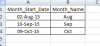
If you look at the data table, 10/1 and 10/2 dates are grouped with September because they are part of the September period for our GL calendar. I basically need an if statement that takes the date and determines what range it is in and returns the appropriate month. The problem is that I'm going to have 24 ranges.
 

Attachments

Check this..

=LOOKUP(b2,{42005,42037,42065,42100,42128,42156,42191,42219,42247,42282,42310,42338},{"Jan","Feb","Mar","Apr","May","Jun","Jul","Aug","Aug","Oct","Nov","Dec"})

Or

=text(date(2015,LOOKUP(b2,{42005,42037,42065,42100,42128,42156,42191,42219,42247,42282,42310,42338},row($1:$12)),1),"mmm")
 
Thanks for the help on this. I added your formula and it worked, however I simplified it. I exported our GL calendar dates from our system for 2014 and 2015 and placed them in a vertical column on another sheet and used vlookup. That way I can add our 2016 GL Calendar and not have to change my formula. Thanks!
 
Thanks for the help on this. I added your formula and it worked, however I simplified it. I exported our GL calendar dates from our system for 2014 and 2015 and placed them in a vertical column on another sheet and used vlookup. That way I can add our 2016 GL Calendar and not have to change my formula. Thanks!

That's what i would also prefer in place of hardcoded formula.
 
Back
Top