• Hi All

    Please note that at the Chandoo.org Forums there is Zero Tolerance to Spam

    Post Spam and you Will Be Deleted as a User

    Hui...

  • When starting a new post, to receive a quicker and more targeted answer, Please include a sample file in the initial post.

GET ALL element from web table

Hi @luca90 & @AliGW,

Here is the solution to extract all the data from the table on that webpage.
I have attached the complete Excel spreadsheet to this response, so you don't need to copy or paste any code yourself. Everything is pre-configured and ready to use!

How to use it:
  1. Open the attached spreadsheet.
  2. Make sure macros are enabled if Excel prompts you.
  3. Simply click the "Run" button on the sheet.
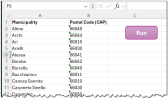
The script will automatically connect to the live webpage, bypass the security layers using a targeted CSS selector (div.box-dis-cont), and pull all the municipalities along with their corresponding 5-digit postal codes (CAP) directly into your table within seconds.
If this spreadsheet helps you get all the values cleanly, please don't forget to hit the thumbs-up (upvote) button!

Thanks!


1780598220591.png
 

Attachments

Hi @luca90 & @AliGW,

Here is the solution to extract all the data from the table on that webpage.
I have attached the complete Excel spreadsheet to this response, so you don't need to copy or paste any code yourself. Everything is pre-configured and ready to use!

How to use it:
  1. Open the attached spreadsheet.
  2. Make sure macros are enabled if Excel prompts you.
  3. Simply click the "Run" button on the sheet.
The script will automatically connect to the live webpage, bypass the security layers using a targeted CSS selector (div.box-dis-cont), and pull all the municipalities along with their corresponding 5-digit postal codes (CAP) directly into your table within seconds.
If this spreadsheet helps you get all the values cleanly, please don't forget to hit the thumbs-up (upvote) button!

Thanks!


View attachment 91525

tks bro
 
Back
Top