• Hi All

    Please note that at the Chandoo.org Forums there is Zero Tolerance to Spam

    Post Spam and you Will Be Deleted as a User

    Hui...

  • When starting a new post, to receive a quicker and more targeted answer, Please include a sample file in the initial post.

Excel: How to perform exact keyword matching in a sentence

anishms

Member
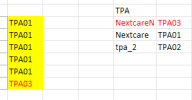
I am trying to identify specific keywords within a sentence in Excel and return the corresponding value. Currently, I am using the SEARCH function; however, it treats “Nextcare” and “NextcareN” as the same because it performs partial matching.

My requirement is to:
  • Treat “Nextcare” and “NextcareN” as separate and distinct keywords
  • Match only the exact keyword within the sentence
  • Return the corresponding value based on the exact match
I have attached a sample file to illustrate the issue and the expected output.
Could someone please suggest the best approach or formula to achieve exact keyword matching in this scenario?
 

Attachments

One way, but you have to remember to sort by the TPA column so that the longer strings are at the top:
1766490825408.png
Another way could be to use REGEXTEST if you have such a function available as a function on a sheet? This will need an understanding of regular expressions, but then the data won't need to be sorted:
In cell E1 copied down:
Code:
=IFERROR(INDEX($I$5:$I$7,XMATCH(TRUE,REGEXTEST(C5,"\b" & $H$5:$H$7 & "\b",1))),INDEX($I$5:$I$7,XMATCH(TRUE,REGEXTEST(D5,"\b" & $H$5:$H$7 & "\b",1))))
Note that in cell C10 you have no space between the sequence of xs and NextCareN so you'd not want to find NextCareN but I think that's your typo!
 
Thanks for the solution! Appreciate the clear explanation and example
I'm not sure about always having a space b/w the keyword, as I’m working on a bank statement description column. Hence, I can’t rely on spaces or fixed delimiters being present. Would there be a way to handle exact matching in such cases as well?
 
I'm not sure about always having a space b/w the keyword, as I’m working on a bank statement description column. Hence, I can’t rely on spaces or fixed delimiters being present. Would there be a way to handle exact matching in such cases as well?
With the regex solution you don't always need a space. It's looking for a 'word boundary' (that's the "\b"s in the formula), this includes the beginning or end of a phrase, things such as commas, semicolons. colons, full stops count as word boundaries.
If you still want to find NextCare or NextCareN if it's without word boundaries, you'll need to nest your IFERROR/IFs so that it includes your original method later in the formula but you'll have to make sure the TPA column is sorted.
Check out the IFS function, it might be easier to put together a formula; easier than nesting. You can make the last condition a plain TRUE with what you want to see in the cell if none of the other conditions apply.
 
Last edited:
Back
Top