Hi All,
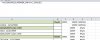
I have a formula in macro that places numbers in column D (format of column D is 'General). The values come in left-aligned. There is a formula (generated by the same macro) in Column E that references column D. The formula returns an #N/A. But, when I double-click in the referenced cell, and move the cursor away, the contents shifts to the right - and the formula then works??!!
If it helps,
this is the macro's formula for column D:
ActiveCell.FormulaR1C1 = "=IF(RC[-1]<>"""",RC[-1],R[-1]C)"
this is the macro's formula for column E:
ActiveCell.FormulaR1C1 = "=VLOOKUP(RC[-1],PERNER_MIP!C[-4]:C[-2],3,FALSE)"
Attached us a visual (I hope). Thank you, this is drivng me insane..
I have a formula in macro that places numbers in column D (format of column D is 'General). The values come in left-aligned. There is a formula (generated by the same macro) in Column E that references column D. The formula returns an #N/A. But, when I double-click in the referenced cell, and move the cursor away, the contents shifts to the right - and the formula then works??!!
If it helps,
this is the macro's formula for column D:
ActiveCell.FormulaR1C1 = "=IF(RC[-1]<>"""",RC[-1],R[-1]C)"
this is the macro's formula for column E:
ActiveCell.FormulaR1C1 = "=VLOOKUP(RC[-1],PERNER_MIP!C[-4]:C[-2],3,FALSE)"
Attached us a visual (I hope). Thank you, this is drivng me insane..