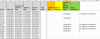
The Detention Clock calculation is as follows:
-Detention Clock starts on the Day of Delivery(Col D) and ends on the Unload Date( Col E). If the delta between the 2 dates is greater than the Free days mention below calculate how many days over.
- if the Ship day(Col B) and delivery day(Col D) are the same there are 4 free days. If not there are 3 free days( Free Days)
-The tricky part is below- Solve for the Last Free Day ( Col G)
- No detention on the 1st weekend after delivery. If a shipment delivers on the weekend, that is the 1st weekend.
Days of Detention is Last Free Day(Col G) - Unload Date( col E)
Use as many helper cells as you need please.
-Detention Clock starts on the Day of Delivery(Col D) and ends on the Unload Date( Col E). If the delta between the 2 dates is greater than the Free days mention below calculate how many days over.
- if the Ship day(Col B) and delivery day(Col D) are the same there are 4 free days. If not there are 3 free days( Free Days)
-The tricky part is below- Solve for the Last Free Day ( Col G)
- No detention on the 1st weekend after delivery. If a shipment delivers on the weekend, that is the 1st weekend.
Days of Detention is Last Free Day(Col G) - Unload Date( col E)
Use as many helper cells as you need please.