• Hi All

    Please note that at the Chandoo.org Forums there is Zero Tolerance to Spam

    Post Spam and you Will Be Deleted as a User

    Hui...

  • When starting a new post, to receive a quicker and more targeted answer, Please include a sample file in the initial post.

Data Entry Form

StarMusk10

Member
In my data table, column "A" is organized by Unit name. Right now to enter data into the table for a specific Unit, I have to add a row under the last entry of that unit and then enter the data. Is there a way to build a entry form that will automatically add the data under the last entry of the unit selected? For example, In the form I select the unit name "ICU" from a drop down list and enter the data into form. Once I hit submit this will add a new Row underneath Row 9. Same thing goes if I select "PCU" in the entry form it will add the data I enter below Row 17. Clear as mud??? Great!

Thank you in advance for your help.
 

Attachments

In my data table, column "A" is organized by Unit name. Right now to enter data into the table for a specific Unit, I have to add a row under the last entry of that unit and then enter the data. Is there a way to build a entry form that will automatically add the data under the last entry of the unit selected? For example, In the form I select the unit name "ICU" from a drop down list and enter the data into form. Once I hit submit this will add a new Row underneath Row 9. Same thing goes if I select "PCU" in the entry form it will add the data I enter below Row 17. Clear as mud??? Great!

Thank you in advance for your help.


On the data sheet under Birthing just type the Units and the data and excel will automatically create another row and store the data in the table. Please see attached file. Once you enter the data you can sort it.

I know very little in VBA
 

Attachments

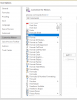
Perhaps this little standard Excel feature may help you
via the help section, search for form and add it to QAT/Ribbon
upload_2018-12-28_9-9-37.png

or via Excel options
upload_2018-12-28_9-11-18.png

EDIT: forgot to mention, you must select a cell within the table to use it.
 
Hi
Is this enough to chase the nurses in the mud?:DD
See attached.
You have a sheet Cover, push the button and fill in the form,push submit and the record will be added at the right place. The only thing that I changed is I gave units a number because in unit PSICU there is also ICU.,with the number added excel kows the difference.
 

Attachments

On the data sheet under Birthing just type the Units and the data and excel will automatically create another row and store the data in the table. Please see attached file. Once you enter the data you can sort it.

I know very little in VBA

Thank you for your response
 
Hi
Is this enough to chase the nurses in the mud?:DD
See attached.
You have a sheet Cover, push the button and fill in the form,push submit and the record will be added at the right place. The only thing that I changed is I gave units a number because in unit PSICU there is also ICU.,with the number added excel kows the difference.

This works great! Could you give a tutorial on how you accomplished this or point me to some resources. I want to learn how to do this so I can utilize it in some other areas.

Thanks again.
 
Thank you, I'm still learning how to understand the VBA Macros. I have been working with the form and found that when you add a new entry with the form it deletes the row below it in the Data set and then adds the data instead of adding a new row. Its causing me to loose data for the unit below. Every unit needs to keep its previous entries. Do I need to change the way my data table is designed or can this be corrected in the code?

Thanks,
Todd
 

Attachments

Hi Todd @StarMusk10, I've tried Bellekes' code and it is working fine on my pc. The row gets inserted in the table and rows shift down.
Can you add a bookmark on the code behind the form, and press F8 to step through the code to detect where it goes wrong at your end.

EDIT: @Belleke , indeed with F8 it is working, when using the form, new row gets inserted, but the total number of rows in the table does not change. Hence data gets lost as stated by Todd.
 
Last edited:
Back
Top