• Hi All

    Please note that at the Chandoo.org Forums there is Zero Tolerance to Spam

    Post Spam and you Will Be Deleted as a User

    Hui...

  • When starting a new post, to receive a quicker and more targeted answer, Please include a sample file in the initial post.

Creating Pivot Table directly from Text File...it is not working

PP3321

Active Member
I have a text file with 3 columns separated by commas.
(Column A, Column B, Column C)

I want to create a Pivot Table directly from this file.

I select this file as external data source
but I get the following error message

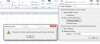
"The type of connection selected cannot be used to create a pivot table."

Can anyone please explain to me what this message means?
Does it mean that we can not use text file as external data source...?

Thanking you in advance...


Pivot Table from text file.png
 
Use PivotTable Wizard, it's usually bit more involved than just using connection.

Press ALT + D then P to bring up Wizard.

1. Choose External data source and hit Next then "Get Data"
2. Select <New Data Source> and hit OK.
3. Give name to the data source (whatever makes sense).
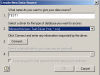
4. Choose Microsoft Access Text Driver and click connect.
upload_2016-4-21_15-12-53.png
5. Uncheck "Use Current Directory" and select the directory where your text file is located. You can set options, but if your text file is delimited by comma, it should work as is.
6. You can select the default table as your text file next and hit OK.
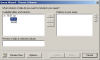
7. You will see QuryWizard move over your columns and hit next.
upload_2016-4-21_15-16-56.png

8. You can set quite a few query options, but unless you need it just hit next and finish Query Wizard

9. Back on Pivot Wizard, follow screen tips and you are done.
 
Back
Top