
Hi all,
I approached this issue thinking it fairly simple, yet I'm having great difficulty.
A sample section of my data sheet is below:
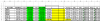
As you can probably see I am already using conditional formatting to highlight a measurement if it is out of tolerance, i.e. not between the Upper and Lower limits. Now I am trying to use the COUNTIF formula to count the total number of measurements that are out of tolerance for a data set (column H).
I have successfully been able to do this with the following:
=COUNTIF(H4:H4,"<"&G4)+COUNTIF(H4:H4,">"&E4)+COUNTIF(H5:H5,"<"&G5)+COUNTIF(H5:H5,">"&E5) ...etc
It works and it gives me the result I need, but I would have to do this for every single measurement point (>200), which in my despair I have attempted and unfortunately reached the character cap for excel formulas before completing the formula.
So I ask, this there a simpler approach to this? Something along the lines of:
=COUNTIFS(H4:H232,"<"&G4:G232,H4:H232,">"&E4:E232) which unfortunately didnt work.
Many Thanks in advance
I approached this issue thinking it fairly simple, yet I'm having great difficulty.
A sample section of my data sheet is below:
As you can probably see I am already using conditional formatting to highlight a measurement if it is out of tolerance, i.e. not between the Upper and Lower limits. Now I am trying to use the COUNTIF formula to count the total number of measurements that are out of tolerance for a data set (column H).
I have successfully been able to do this with the following:
=COUNTIF(H4:H4,"<"&G4)+COUNTIF(H4:H4,">"&E4)+COUNTIF(H5:H5,"<"&G5)+COUNTIF(H5:H5,">"&E5) ...etc
It works and it gives me the result I need, but I would have to do this for every single measurement point (>200), which in my despair I have attempted and unfortunately reached the character cap for excel formulas before completing the formula.
So I ask, this there a simpler approach to this? Something along the lines of:
=COUNTIFS(H4:H232,"<"&G4:G232,H4:H232,">"&E4:E232) which unfortunately didnt work.
Many Thanks in advance
