
You are using an out of date browser. It may not display this or other websites correctly.
You should upgrade or use an alternative browser.
You should upgrade or use an alternative browser.
convert the figure crore
- Thread starter ushaanu
- Start date

Khalid NGO
Excel Ninja
Khalid NGO
Excel Ninja
Thank for the reply
actually in excel cell have already other formula so I need some way out thru formatting.
Thanks
Anu
So can you wrap your formula with ROUND?
something like:
=ROUND(SUM(A1:A10)/10000000,2)&" core"

John Jairo V
Well-Known Member
Hi to all!
Please check this:
http://chandoo.org/wp/2010/07/26/indian-currency-format-excel/
Blessings!
Please check this:
http://chandoo.org/wp/2010/07/26/indian-currency-format-excel/
Blessings!
John Jairo V
Well-Known Member
Hi... This can be a way for do it... with a "tricky" part.
Check the file please! Blessings!
Edit: Check the link with Explanation.
http://chandoo.org/wp/2012/01/31/custom-number-formats-multiply-divide-by-any-power-of-10/
Check the file please! Blessings!
Edit: Check the link with Explanation.
http://chandoo.org/wp/2012/01/31/custom-number-formats-multiply-divide-by-any-power-of-10/
Attachments
Last edited:
Khalid NGO
Excel Ninja
Hi @John Jairo V
That is great...
What is the "Tricky Part"?

When i use format painter, result is same but, when i copy your custom format to any new cell,
Why "%" is reflecting at end?
Even at the type area...
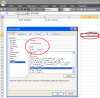
Your clarification is required.
Regards,
That is great...
What is the "Tricky Part"?
When i use format painter, result is same but, when i copy your custom format to any new cell,
Why "%" is reflecting at end?
Even at the type area...
Your clarification is required.
Regards,
John Jairo V
Well-Known Member
Hi @Khalid NGO
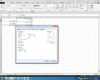
If you read the link with explanation, you could see the "tricky" part. Press Ctrl + J before the "%", format up vertically and decrease the high of the row. ¡That's it! Blessings!
If you read the link with explanation, you could see the "tricky" part. Press Ctrl + J before the "%", format up vertically and decrease the high of the row. ¡That's it! Blessings!
Khalid NGO
Excel Ninja
Hi @Khalid NGO
If you read the link with explanation, you could see the "tricky" part. Press Ctrl + J before the "%", format up vertically and decrease the high of the row. ¡That's it! Blessings!
Thanks John for the clarification.
Thanks Anu.
Happy learning