• Hi All

    Please note that at the Chandoo.org Forums there is Zero Tolerance to Spam

    Post Spam and you Will Be Deleted as a User

    Hui...

  • When starting a new post, to receive a quicker and more targeted answer, Please include a sample file in the initial post.

Convert text to number

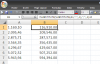
I have a page of figures imported frm SAP. It shows them with . , in the wrong place. Is there any way in Excel I can copy and paste these figures without the punctions and decimals. And then change to currency. The normal format tool is not working.

1.169,10
2.095,46
2.875,71
3.564,35
4.296,67
5.072,52
5.943,94
 
Hi:

Use the following formula
=SUBSTITUTE(SUBSTITUTE(A1,".",,1),",",,1)
assuming your text is in cell A1

Thanks
 
Thank for this. It worked and removed the , .. When I copy and paste special on the data. It wont let me change it to currency in the format cell option.
 
Thank for this. It worked and removed the , .. When I copy and paste special on the data. It wont let me change it to currency in the format cell option.

Hi,

Slight update in Nebu's formula will give you real numbers:
=SUBSTITUTE(SUBSTITUTE(A1,".",,1),",",,1)+0
or
=SUBSTITUTE(SUBSTITUTE(A1,".",,1),",",,1)*1

Regards,
 
Back
Top