• Hi All

    Please note that at the Chandoo.org Forums there is Zero Tolerance to Spam

    Post Spam and you Will Be Deleted as a User

    Hui...

  • When starting a new post, to receive a quicker and more targeted answer, Please include a sample file in the initial post.

Conditional Formatting

Gunjan

New Member
HI

i'm trying to create a CF but having hard time getting the results i need. i'm looking to compare monthly results with Target and do a comparison using ICON sets. currently based on the attached file cells D4 to D6 are not portraying correct results as those all should be pointing down as they are below target. please help

thanks
 

Attachments

upload_2016-2-17_11-22-13.png

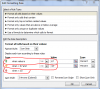
Note the parameters you set in the CF. You have it set per CF Icon values not the Target values in column C. Is that not what you wanted?
If not, you will need to create a CF for each row in Column D based on Target value in the adjacent column C. Instead of having one CF, you will need one for each of the six rows you are comparing with their different values; therefore, instead of the range =$D$3:$D$11, you will have =$D$3 for the first CF, =$D$4 for the second CF, etc., and adjust the Icon value for each row in Column C accordingly. Does that make sense to you?
 
Last edited:
ok so there is no way i can do one CF which would apply to all the rows? right now i only have 6 as this was an example but i would have close to 100.

Thanks for your help
 
It all depends on what results you require.
If every Target percentage needs to be different, then yes you will need 100 CFs, otherwise no.
It sounds like you need the Icons to point depending on the Target percentage, not the one-size-fits-all that the Icon value CF is set up to do....unless someone else out there sees another way to solve the problem.
 
Last edited:
@Gunjan
Do it need to have those arrows? 12*100 = 1200 arrows + 24
How about three background colors with same information without CF?
Or if really need those arrows ... it would be okay too.
I could make a sample if You are really interesting...
 
@Gunjan
as I wrote in #8 Reply:
How about three background colors with same information without CF?
I used: / , + , - , > , < , <> , = , Match ...
If You change Cell[A1] value then You can get more or less 'same values'.
Like: 6x128 target 50% Jan 48,6% ...
A1 = 1% means same value 'dark yellow' range is 49,5% ... 50,5%
if You change A1 to 3% then previous range will be 48,5% ... 51,5%.
>> Ideas ... Questions?
 
Back
Top