
Hi,
I am using a spreadsheet to keep track of our teams tasks throughout the week.
Each task requires the team member to have prerequisites before they are able to start the task, so I was going to use conditional formatting to highlight the cell if the prerequisite conditions are not met.
To achieve this, I have a 3 sheets in my workbook
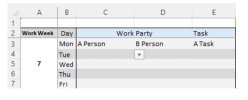
The first one Tasks – This is a table where I use a dropdown list to select the team members of the working party, and then another dropdown to select their task.
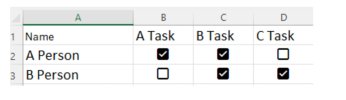
The next sheet is Cond – this is a table, where the first column is the team members, and then the following columns are the tasks. I have then placed a checkbox in the table cells which would be ticked if the prerequisites are met
The 3rd sheet is List – this contains the lists I use for the dropdowns on the Tasks page.
I thought the following would work for conditional formatting (under new rule>use a formula)
=XLOOKUP($E$3, Cond!$B$1:$D$1, Cond!$A$2:$D$3) = TRUE
· E3 is the cell where I select the task
· Cond!$B$1:$D$1 is the table header that contains the task names
· Cond!$A$2:$D$3 is the table where the checkboxes are
This isn't working and wondered if anyone could give me some advise on how to achieve this.
Thank you for your help
I am using a spreadsheet to keep track of our teams tasks throughout the week.
Each task requires the team member to have prerequisites before they are able to start the task, so I was going to use conditional formatting to highlight the cell if the prerequisite conditions are not met.
To achieve this, I have a 3 sheets in my workbook
The first one Tasks – This is a table where I use a dropdown list to select the team members of the working party, and then another dropdown to select their task.
The next sheet is Cond – this is a table, where the first column is the team members, and then the following columns are the tasks. I have then placed a checkbox in the table cells which would be ticked if the prerequisites are met
The 3rd sheet is List – this contains the lists I use for the dropdowns on the Tasks page.
I thought the following would work for conditional formatting (under new rule>use a formula)
=XLOOKUP($E$3, Cond!$B$1:$D$1, Cond!$A$2:$D$3) = TRUE
· E3 is the cell where I select the task
· Cond!$B$1:$D$1 is the table header that contains the task names
· Cond!$A$2:$D$3 is the table where the checkboxes are
This isn't working and wondered if anyone could give me some advise on how to achieve this.
Thank you for your help
