
You are using an out of date browser. It may not display this or other websites correctly.
You should upgrade or use an alternative browser.
You should upgrade or use an alternative browser.
Conditional formatting - Help - Bit complicated
- Thread starter ramnaidu
- Start date

Hi AIMHi Ram,
Please check the attached file if this is what you are looking for.
Regards
Thanks for your message, but it was bit different what I need.
In sheet 1 there is only one cell C1(and the data in it comes from no of calculations) and there are 100 cells in sheet 2.
If C1 in sheet 1 is in top 25 of 100 cells in sheet 2 then it should be green.
The value of C1 in sheet 1 will change frequently and so conditional formatting should change accordingly.
Hope I have explained you the situation correctly.

Somendra Misra
Excel Ninja
Hi,
See the attached file.
Regards,
HI Somendra
Thanks for your reply but the spreadsheet just had value...Sorry.
Can you explain a bit, if you can..
Somendra Misra
Excel Ninja
Sheet 1 Cell A1 has CF based on Sheet2 Values.
Regards,
Regards,
Hi SomeshSheet 1 Cell A1 has CF based on Sheet2 Values.
Regards,
I think CF broken or something happened, I cant see anything any CF in the spreadsheet you attached.
Somendra Misra
Excel Ninja

bobhc
Excel Ninja
Good day ramnaidu
You do not see CF as such, it is applied to the cells as per the CF rules.
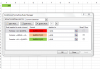
The above are the rules that Somendra has put in place.
=A1<QUARTILE(Sheet2!$A$1:$A$19,1)
=AND(A1>=QUARTILE(Sheet2!$A$1:$A$19,1),A1<=QUARTILE(Sheet2!$A$1:$A$19,3))
=A1>=QUARTILE(Sheet2!$A$1:$A$19,3)
.
You do not see CF as such, it is applied to the cells as per the CF rules.
The above are the rules that Somendra has put in place.
=A1<QUARTILE(Sheet2!$A$1:$A$19,1)
=AND(A1>=QUARTILE(Sheet2!$A$1:$A$19,1),A1<=QUARTILE(Sheet2!$A$1:$A$19,3))
=A1>=QUARTILE(Sheet2!$A$1:$A$19,3)
.
Hi BOBGood day ramnaidu
You do not see CF as such, it is applied to the cells as per the CF rules.
View attachment 7290
The above are the rules that Somendra has put in place.
=A1<QUARTILE(Sheet2!$A$1:$A$19,1)
=AND(A1>=QUARTILE(Sheet2!$A$1:$A$19,1),A1<=QUARTILE(Sheet2!$A$1:$A$19,3))
=A1>=QUARTILE(Sheet2!$A$1:$A$19,3)
.
Thanks for the reply
Please find the attached spreadsheet and help with my example
When I selected Nike on sheet 1 his conversion rate is 0.25, all the details in sheet 1 i do get from sheet 2.
So conversion rate for Mike is 0.25 which is last so it should be red.
If I have selected Antha on sheet 1 then conversion rate is 100% then conditional formatting should be green.
Hope I explained correctly. The data on sheet is from sheet. please help
Attachments
Forgot to say I am using excel 2007.Good day ramnaidu
You do not see CF as such, it is applied to the cells as per the CF rules.
View attachment 7290
The above are the rules that Somendra has put in place.
=A1<QUARTILE(Sheet2!$A$1:$A$19,1)
=AND(A1>=QUARTILE(Sheet2!$A$1:$A$19,1),A1<=QUARTILE(Sheet2!$A$1:$A$19,3))
=A1>=QUARTILE(Sheet2!$A$1:$A$19,3)
.
NARAYANK991
Excel Ninja
Hi ,
See if this is what you want.
Narayan
Thanks a lot Narayan, this helped me a lot..
Somendra Misra
Excel Ninja
Glad you solve it. Welcome back anytime.
Regards,
Regards,
Glad you solve it. Welcome back anytime.
Regards,
Thanks Somendra, I have mixed your ideas with BOBHC and Narayan
Really appreciate that, I struggled a lot yesterday in understanding as I have never used Quartile formula before.