• Hi All

    Please note that at the Chandoo.org Forums there is Zero Tolerance to Spam

    Post Spam and you Will Be Deleted as a User

    Hui...

  • When starting a new post, to receive a quicker and more targeted answer, Please include a sample file in the initial post.

conditional formatting font color

Can anyone walk me through conditional formatting cells so that

if the value is </= 24.00 the font is automatically green
if the value is > 24.00 the font is automatically red

Thank you!
 
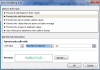
1. Highlights cells you want to apply the formatting to
2. Click Conditional formatting > New Rule
3. Select Format Only Cells That Contain
4. Enter in your first rule
5. Chose Format button and change font color to green
6. Click Ok
7. Repeat for your second rule
 
Back
Top