
• Hi All

    Please note that at the Chandoo.org Forums there is Zero Tolerance to Spam

    Post Spam and you Will Be Deleted as a User

    Hui...

  • When starting a new post, to receive a quicker and more targeted answer, Please include a sample file in the initial post.

Color code a pivot table column based on the difference between 2 columns

Adriana

New Member
Hello,

I have 2 columns in the Row Labels area of a pivot table and I would like to color code the second one if the corresponding cell from the other column has a higher value.

As in the uploaded example, I would like to have a color code rule on the Delegations or Discount column that will highlight the cell in which the the Discount value is higher than the corresponding Delegations value.

Thanks a lot for your help and wish you a wonderful day!

Adriana
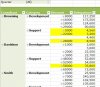
example.JPG
 
Hi Adriana ,

Select the two columns , say C and D ; suppose the first cell of data is C4.

Click on Conditional Formatting , New Rule , Use a Formula to determine which cells to Format.

Use the formula =$C4>$D4 , and apply the colour fill of your choice.

Narayan
 
Hello Narayank991,

Thanks a lot for your reply! Although it works, it seems that it became more complicated than what it was in the first phase, so this brings another question from my side, as my pivot table requirements are different: how would I manage to have a color code for an entire row of the pivot table based on some conditions like in the following "Formula"=IF(AND(T6<K6,S6>AB6,U6="AND"),"COLOR MY LINE","DO NOT COLOR"), considering the fact that these cells contain numbers. I would have also uploaded a picture of the file, but it doesn't show too much.

Thanks a lot once more and wish you a wonderful day!

Adriana
 
Hi Adriana ,

Firstly , a CF formula using the IF function is simple because you only need to specify the TRUE condition ; nothing happens if the condition being tested evaluates to FALSE !

In your case , going by the 'formula' you have given , can I say that you want the row ( I do not know what the range is , but can I say A6 through D6 ) to be coloured if :

T6 is less than K6
and
S6 is greater than AB6
and
.........................

I have not understood the part about U6 = "AND" , since later you say that all these cells contain numbers ; can you clarify the third condition ?

Narayan
 
Hello Narayan,

Sorry, I meant that in the first 2 conditions I compare numbers and then in the last one I have either "AND" or "OR". Now I understand what you mean!

Adriana
 
Hi Adriana ,

So , your CF formula will be :

=AND($T6<$K6,$S6>$AB6)

Select your range where you wish to apply the CF , say B6:J17 , and enter this formula.

Narayan
 
Back
Top