
You are using an out of date browser. It may not display this or other websites correctly.
You should upgrade or use an alternative browser.
You should upgrade or use an alternative browser.
Cell Lock to be based on Formula
- Thread starter Pasadu
- Start date
Thank youNo.
You could lock those manually.

p45cal
Well-Known Member
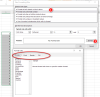
I tried this but I don't get a Protection tab:Click on the "Format" button to choose the formatting options for the cell.
In the "Format Cells" window, click on the "Protection" tab.

pecoflyer
Well-Known Member
Actually it's triggered in the Alignment group clicking on the small arrow in the right-lower corner
 support.microsoft.com
( New for me also )
support.microsoft.com
( New for me also )
Lock cells to protect them in Excel - Microsoft Support
How to lock cells in Excel worksheets and workbooks to protect your data.
support.microsoft.com

p45cal
Well-Known Member
I don't think @shili12 is correct.
I would explore doing this with Data Validation.
Select cell C5, bring up its Data Validation dialogue and complete as follows:
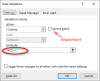
It is important that the Ignore blank tickbox is unticked as in the picture.
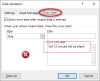
Then you can go to the Error Alert tab and provide an appropriate message to the user:
I would explore doing this with Data Validation.
Select cell C5, bring up its Data Validation dialogue and complete as follows:
It is important that the Ignore blank tickbox is unticked as in the picture.
Then you can go to the Error Alert tab and provide an appropriate message to the user:
Last edited: