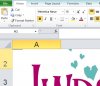
A co-worker entered a ton of data on a master workbook and emailed back to me. However, I can't see or select row 1. I have tried "go to", "hide/unhide", selected entire worksheet and, under "format", manually entered row height. I still don't see it. Any ideas?
It goes to A1. However, if you look at the picture, even at 400% zoom, I still can't see Row 1. When I've selected A1 and try to format row height, nothing happens. When I select the entire sheet and format row height, nothing happens. I appreciate your speedy reply.
Hmm, interesting. I take it that Unfreezing didn't help?
The other thing of interest is that even though you are in A1, the row 2 label is lit up, indicating that you are also in that row. Is it possible that A1 and B1 are merged together? See if they can be unmerged.
Would it be possible to delete all the contents from the file and upload the sheet?