• Hi All

    Please note that at the Chandoo.org Forums there is Zero Tolerance to Spam

    Post Spam and you Will Be Deleted as a User

    Hui...

  • When starting a new post, to receive a quicker and more targeted answer, Please include a sample file in the initial post.

Automatically download .csv file

Is it possible to save all three file in one workbook .Like in sheet 1,shee2,shee3 and when we change date for download it overwrite in same sheet .Thanks for Help .
 
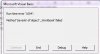
Sorry But Not working this time .After running code files get downloaded but not saved .Can not locate downloaded file .Messege flash is Method name of object_woorkbook failed.Runtime error .
 
Oops, I see the mistake. In the code, I created a master workbook, but then forgot to save it. :oops:
This should be better now.
 

Attachments

Sir download successfully from all three link but only first saved .Can you make it to save in seperate sheet in master workbook and when date is changed it overwrite in master workbook .Thanks again for your help .
 
Hi, Ghanashyam!
Change this:
Code:
            ws.Copy after:=myFile.Worksheets(myFile.Worksheets.Count)
by this:
Code:
            ws.Copy after:=mainFile.Worksheets(mainFile.Worksheets.Count)
Regards!
 
Hi, Ghanashyam!
Strange, it works for me, I got a file saved with 3 worksheets, one for each .CSV downloaded file. Check if NARAYANK991's file works for you; if not then consider uploading the file that you tried to fix or posting the whole procedure code.

Regards!
 
SIR NARAYANK991 & SIR JB7 .Thanks Download in three worksheet is succesfull .Problem is with change in date doesnot save in same workbook .
 

Attachments

'**************************** FUNCTION TO GET THE NSE FUTURES VOLATILITY DATA
'****************************************************************************

Public Sub GetVolatilityDataFromNSEIndia()

Dim ws As Worksheet, strFile As String
Dim EndDate As Date
Dim wd As Long
Dim myQueryTable As QueryTable
On Error Resume Next
Dim qTable As QueryTable
For Each qTable In Test.Worksheets("FOVOLT").QueryTables
qTable.ResultRange.ClearContents
qTable.Delete
Next qTable

Set ws =Test.Worksheets("FOVOLT")


If (TimeSerial(Hour(Now), Minute(Now), Second(Now)) > TimeSerial(Hour(TimeValue("4:00:00 PM")), Minute(TimeValue("4:00:00 PM")), Second(TimeValue("4:00:00 PM")))) Then
EndDate = DateSerial(Year(Now), Month(Now), Day(Now))

Else

EndDate = DateSerial(Year(Now), Month(Now), Day(Now) - 1)

End If

wd = Weekday(EndDate)
If (wd = 7) Then
************************************************
This is one ans i got in another forum .I dont have programming knowldege .Chek if it help you Friends .Thanks
 
Back
Top