• Hi All

    Please note that at the Chandoo.org Forums there is Zero Tolerance to Spam

    Post Spam and you Will Be Deleted as a User

    Hui...

  • When starting a new post, to receive a quicker and more targeted answer, Please include a sample file in the initial post.

Add rows based on condition

JUES

New Member
Hello friends, I hope you are well.

I need a macro that, when the workbook is opened, validates the set of records in Column O of Hoja57 (MATRIZ3). For each valid record that meets this condition (O ≥ 1), the macro should automatically insert additional rows into Row B3 of Hoja57 (MATRIZ3) according to the number of records that meet the condition O ≥ 1.

To validate records that meet the condition O ≥1, the macro must compare the data in Column F of Hoja57 (MATRIZ3) with that of Hoja62.Range("$A$9").Value (FORMATO) and the data in Column G of Sheet57 (MATRIZ3) with that of Hoja62.Range("$C$11") .Value (FORMATO). It should only consider as valid those records whose match is exact. The cells (B3:O3) of the inserted rows must be colored RGB(255, 255, 204) to avoid repeating records each time the workbook is opened. The macro must be able to distinguish whether the O ≥ 1 records have already been validated and the rows inserted in B3.

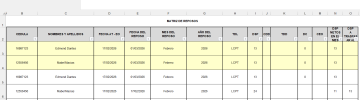
For example, if cell O3 y O4 validates the condition O ≥ 1, the cells in the new row inserted in B3 and B4 must meet the following conditions:

  • B3 = B5*
  • C3 = C5*
  • D3 = D5*
  • E3 = Hoja62.Range("$A$10").Value (FORMATO)
  • F3 = Hoja62.Range("$A$9").Value (FORMATO)
  • G3 = Hoja62.Range("$C$11").Value (FORMATO)
  • H3 = H5*
  • I3 = O5*
  • J3 = J5*
  • K3 = K5*
  • L3 = 05*
  • M3 = M5*
* Note that the row moves as new records are inserted
  • B4 = B6*
  • C4 = C6*
  • D4 = D6*
  • E4= Hoja62.Range("$A$10").Value (FORMATO)
  • F4 = Hoja62.Range("$A$9").Value (FORMATO)
  • G4 = Hoja62.Range("$C$11").Value (FORMATO)
  • H4 = H6*
  • I4 = O6*
  • J4 = J6
  • K4 = K6*
  • L4 = 0
  • M4 = M6*
* Note that the row moves as new records are inserted

I have attached an image with an example of the expected result.

I would be very grateful for any help you can give me.

 

Attachments

Hi, copy this code into thisworkbook In VBE
save with extension .xlsm. Close and open the file.

Rich (BB code):
Private Sub Workbook_Open()
    Dim wsMatriz As Worksheet
    Dim wsFormato As Worksheet
    Dim lastRow As Long
    Dim i As Long, r As Long
    Dim rigaCorrente As Long
    Dim contaInseriti As Long
    Dim valA9 As Variant, valA10 As Variant, valC11 As Variant
    Dim isDuplicate As Boolean
    Dim oldRow As Long
    
    On Error Resume Next
    Set wsMatriz = ThisWorkbook.Sheets("MATRIZ3")
    Set wsFormato = ThisWorkbook.Sheets("FORMATO")
    On Error GoTo 0
    
    If wsMatriz Is Nothing Or wsFormato Is Nothing Then Exit Sub
    
    valA9 = wsFormato.Range("A9").Value
    valA10 = wsFormato.Range("A10").Value
    valC11 = wsFormato.Range("C11").Value
    
    Application.ScreenUpdating = False
    
    lastRow = wsMatriz.Cells(wsMatriz.Rows.Count, "B").End(xlUp).Row
    contaInseriti = 0
    
    For i = lastRow To 3 Step -1
        rigaCorrente = i + contaInseriti
        
        If IsNumeric(wsMatriz.Cells(rigaCorrente, "O").Value) And Not IsEmpty(wsMatriz.Cells(rigaCorrente, "O").Value) Then
            
            If wsMatriz.Cells(rigaCorrente, "O").Value >= 1 And _
               UCase(Trim(CStr(wsMatriz.Cells(rigaCorrente, "F").Value))) = UCase(Trim(CStr(valA9))) And _
               UCase(Trim(CStr(wsMatriz.Cells(rigaCorrente, "G").Value))) = UCase(Trim(CStr(valC11))) Then
              
                If wsMatriz.Cells(rigaCorrente, "B").Interior.Color <> RGB(255, 255, 204) Then
                    
                    isDuplicate = False
                    For r = 3 To wsMatriz.Cells(wsMatriz.Rows.Count, "B").End(xlUp).Row
                        If wsMatriz.Cells(r, "B").Interior.Color = RGB(255, 255, 204) Then
                            If CStr(wsMatriz.Cells(r, "B").Value) = CStr(wsMatriz.Cells(rigaCorrente, "B").Value) And _
                               wsMatriz.Cells(r, "E").Value2 = wsFormato.Range("A10").Value2 And _
                               UCase(Trim(CStr(wsMatriz.Cells(r, "F").Value))) = UCase(Trim(CStr(valA9))) Then
                                
                                isDuplicate = True
                                Exit For
                            End If
                        End If
                    Next r
                    
                    If Not isDuplicate Then
                        wsMatriz.Rows(3).Insert Shift:=xlDown, CopyOrigin:=xlFormatFromRightOrBelow
                        
                        oldRow = rigaCorrente + 1
                        
                        wsMatriz.Cells(3, "B").Value = wsMatriz.Cells(oldRow, "B").Value
                        wsMatriz.Cells(3, "C").Value = wsMatriz.Cells(oldRow, "C").Value
                        wsMatriz.Cells(3, "D").Value = wsMatriz.Cells(oldRow, "D").Value
                        wsMatriz.Cells(3, "E").Value = valA10
                        wsMatriz.Cells(3, "F").Value = valA9
                        wsMatriz.Cells(3, "G").Value = valC11
                        wsMatriz.Cells(3, "H").Value = wsMatriz.Cells(oldRow, "H").Value
                        wsMatriz.Cells(3, "I").Value = wsMatriz.Cells(oldRow, "O").Value
                        wsMatriz.Cells(3, "J").Value = wsMatriz.Cells(oldRow, "J").Value
                        wsMatriz.Cells(3, "K").Value = wsMatriz.Cells(oldRow, "K").Value
                        wsMatriz.Cells(3, "L").Value = 0
                        wsMatriz.Cells(3, "M").Value = wsMatriz.Cells(oldRow, "M").Value
                        
                        wsMatriz.Range("B3:O3").Interior.Color = RGB(255, 255, 204)
                        
                        contaInseriti = contaInseriti + 1
                    End If
                End If
            End If
        End If
    Next i
    
    Application.ScreenUpdating = True
End Sub
Screenshot 2026-04-01 002911.png
 

Attachments

Back
Top