
• Hi All

    Please note that at the Chandoo.org Forums there is Zero Tolerance to Spam

    Post Spam and you Will Be Deleted as a User

    Hui...

  • When starting a new post, to receive a quicker and more targeted answer, Please include a sample file in the initial post.

Add an "or" statement to a cell

I want to be able write an OR statement for specific cells. Right now I have for example =$L4 in which I am getting a letter EOUD from one row to another. I want to be able to get a letter that may be in say L4 OR M4 depending if there is a letter in that cell or not

In this picture I want to be able to get the U or D from say C5 and put it in L5 and I am using the =$L5. If there is no U in C5 and its in B5 I would want it to go into cell L5. There will either be a U in B or C and a D in E or F

Thank you!!
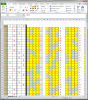
 

Attachments

  • E OR O and U OR D.png
    E OR O and U OR D.png
    128.1 KB · Views: 8
I will have 1 section that will look for E's and O's. The other U's and D's. I want to be able to go to one of my books and copy the numbers (conditional formatting is necessary) and paste them into columns IJKL rows 4:53 for the U's and D's and rows 59:108 if they are E's and O's.

Right now I paste the new data in CDFG, read and translate the data and manually input the letters in column M

Some times for example the U or E may be in column C and others in D. The D and O may be in F or G. I really I would like to be able to just copy and paste C4:G4 through C53:G53 and it will update all the other columns and rows spread across my spreadsheet Examples: OPQR UVWX AA AB AC AD .....

I am not sure if this will take a Macro since I will pasting a new criteria every time in CDFG. If the column spacers (BEH) are going to be a problem, I can take them out)


I appreciate all your help!!!

:)
 

Attachments

So what you're saying is that out of the 4 columns - C, D, F, G - Whatever columns isn't blank, should show up as output in column M - this can be achieved through a Nested IF.

However whilst reading your file I noticed that row C4:G4 & C59:G59 are blank yet it says U & O. So I'm wondering on what basis are you calculating column M. How are you getting whether it is U/D or O/E. The calculation you run on the numbers in columns I:L. How do you translate the data. Your criteria?
 
So what you're saying is that out of the 4 columns - C, D, F, G - Whatever columns isn't blank, should show up as output in column M - this can be achieved through a Nested IF.

Correct!!

However whilst reading your file I noticed that row C4:G4 & C59:G59 are blank yet it says U & O. So I'm wondering on what basis are you calculating column M. How are you getting whether it is U/D or O/E. The calculation you run on the numbers in columns I:L. How do you translate the data. Your criteria?

oops , I pasted them on the wrong row, They should be up one row I will repost
 
However whilst reading your file I noticed that row C4:G4 & C59:G59 are blank yet it says U & O. So I'm wondering on what basis are you calculating column M. How are you getting whether it is U/D or O/E. The calculation you run on the numbers in columns I:L. How do you translate the data. Your criteria?[/quote]


I am copying and pasting the criteria from an external book I:L and having to figure out what to put in M manually. I:L will change all the time
 
Back
Top