
All articles with 'google docs' Tag
{ 8 Comments }
Now Edit Google Spreadsheets using MS Excel
Published on May 21, 2009 in Excel Howtos, Google Spreadsheets - Tip & Tricks
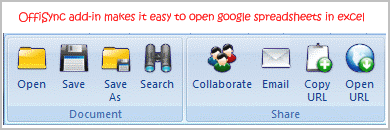
Do you like the cool features of Google docs spreadsheets but too comfortable with MS Excel’s UI? Well, the supercool OffiSync add-in is for you. It is developed for Oudi Antebi an former marketing manager at Microsoft.
Once you finish the installation of the addin you will see a new ribbon in the corresponding applications (word, excel and powerpoint).
Continue »{ 4 Comments }
Google Spreadsheets Introduces Data Validation, Sweet!
Published on Feb 18, 2009 in Google Spreadsheets - Tip & Tricks
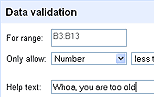
Google Spreadsheets team has introduced another very useful feature to their online excel competitor: Data Validation.
Although the data validation is not as robust as that of Excel’s, it provides basic validations pretty neatly.
{ 4 Comments }
Excel Links of the Week – All Downloads at One Place Edition
Published on Nov 10, 2008 in excel links

25+ Excel Templates – Download and Use [plug] Have you ever wondered what it would be like to get all the excel downloadables in Pointy Haired Dilbert in one simple page? Well, I did and created this simple excel templates – download page. It has 27 templates currently and I will add more as and […]
Continue »The World’s First Music Video in Excel ACDC Rock n Roll Train This is totally cool. ACDC released an ASCII version of their “rock n roll train” video through excel spreadsheet. Why? So that you can download it at your office and watch it while your boss thinks you are working. 😀 I think this […]
Continue »{ 4 Comments }
Major Updates to Google Docs Spreadsheets App – Menus, Named Ranges, Toolbar
Published on Oct 6, 2008 in Learn Excel, technology
Google Docs – spreadsheet application has introduced some major upgrades to their editor today. Some of the key changes include: Introduction of menus to access all spreadsheet functions / features by category: Now the spreadsheet app menus look more like Excel 2003 menus. Looks like Google is trying hard to close gap between the two […]
Continue »
My guest post on monitoring web page changes using google docs is posted in Digital Inspiration – one of the most popular technology blogs. Do read it to learn a little bit about using XPATH, RSS Feeds, Google Spreadsheet import() functions. Here is a summary of the technique: First go to the web page which […]
Continue »
By integrating services like Google Finance, Search in to spreadsheet functions, google docs has paved the way for endless possibilities. Google spreadsheet function GoogleFinance() can be used to build stock portfolio tracker sheet that can fetch historical stock quotes to tell how your money is doing. Click here to see the stock portfolio tracker sheet […]
Continue »Google docs spreadsheet app is going mainstream with each passing day. Recently they have introduced split() formula to divide text in to multiple cells using a user specified delimiter. The syntax for this function is =split(text value, delimeter), for eg. =split(“pointy haired dilbert”, ” “) would result in 3 individual cells with “pointy”, “haired” and […]
Continue »How can you ensure that your blog post, term report or business case is readable without spending a lot of time getting beta reviews from others? Thanks to google docs, you can do that with one click. Just upload your word document / txt file to google docs. Once inside, goto menu > tools > […]
Continue »{ 33 Comments }
Want to Feed RSS to your Excel Sheet? Read this!
Published on Jul 30, 2008 in ideas, Learn Excel
RSS feeds are everywhere. So much that you cannot avoid them in your data processing, analytics or day to day spreadsheet needs. If you can get the RSS feeds to excel sheet you can do pretty interesting things with it, like: Prepare a sheet to watch deals on Amazon, Craigslist, Deals2buy and other favorite sites […]
Continue »Each of us have our mechanisms to track how we spend money. We use Excel, various online sites and software like Quicken or Microsoft Money to track how we spend our bucks. The bottom line is to track where each penny / paisa / cent is going. So, how great would be it be, if […]
Continue »
