
All articles with 'countif()' Tag

Learn how to find which worksheet a max or min value occurs on using this neat formula
Continue »{ 14 Comments }
CP021: How to quickly compare 2 lists in Excel
Published on Oct 2, 2014 in Chandoo.org Podcast Sessions, Excel Howtos
Podcast: Play in new window | Download
Subscribe: Apple Podcasts | Spotify | RSS
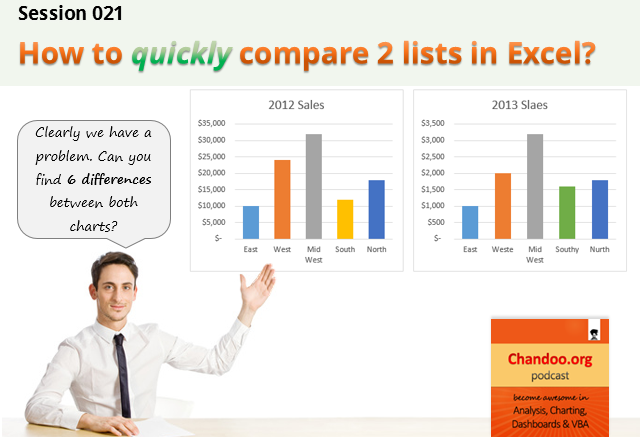
In the 21st session of Chandoo.org podcast, lets compare lists. Quickly
What is in this session?
Comparing things is a favorite pastime for analysts all over the world. Sadly, it is also an area where we waste hours. So in this episode, I share my top secret comparison techniques to save you time.
Note: This is a short format podcast. That means you spend less time listening to it, while becoming more awesome.
In this podcast, you will learn,
- Why I sound like I am on a secret mission at a mafia hideout.
- 5 ways to compare 2 lists
- Manual method
- Conditional Formatting
- Row Differences
- LOOKUP formulas
- COUNTIF formulas
- Bonus tip: Removing duplicates
- Conclusions

{ 229 Comments }
Can you find that pattern? [Homework]
Published on Dec 14, 2012 in Excel Challenges
![Can you find that pattern? [Homework]](https://img.chandoo.org/hw/can-you-find-that-pattern-excel-homework.png)
Are you ready for an Excel challenge?
Today, your job is very simple. Just find a pattern in a text and return corresponding value.
Your Homework:
In a range we have some resource types & their billing rates.
In another range, we have some descriptions. Each description contains a resource type somewhere inside it. We need to retrieve billing rate for each description by looking up which resource type is mentioned in it.
See above diagram.
Continue »{ 19 Comments }
Formula Forensics No. 032 – Creating Dynamic Charts with Non-Contiguous Data
Published on Dec 4, 2012 in Formula Forensics, Posts by Sajan

There are many web pages devoted to Excel Charts and there are many web pages devoted to Creating Dynamic Ranges, but a lot of these suffer when the data is poorly organised or non-contiguous.
Today we look at a Technique for Creating Dynamic Charts with Non-Contiguous Data.
Continue »{ 17 Comments }
Formula Forensics No. 030 – Extracting a Sorted, Unique List, Grouped by Frequency of Occurrence
Published on Oct 4, 2012 in Formula Forensics, Posts by Sajan

Today at Formula Forensics, Guest author Sajan shows us how to extract a sorted, unique list of items, displaying the most frequently occurring items first, while restricting the output based on some additional criteria.
Continue »
Need to count how many unique values occur in a range?
Learn how to do this and how the formula works right here.
{ 29 Comments }
Check if a list has duplicate numbers [Quick tip]
Published on Jun 28, 2012 in Excel Howtos, Learn Excel
![Check if a list has duplicate numbers [Quick tip]](https://img.chandoo.org/q/check-list-for-duplicates-in-excel.png)
A while ago (well more than 3 years ago), I wrote about an array formula based technique to check if a list of values have any duplicates in them.
Today, lets learn a simpler formula to check if a list has duplicate numbers.
Assuming you have some numbers in a range B4:B10 as shown below, we can use MODE + COUNTIF formulas to check if there are any duplicate values in a list.
Continue »
Lykes asked Formula Forensics “How does a formula work?” Lykes has been using the formula without understanding it.
The formula counts how many times the letters from a list of letters occur in a list of words.
Today we look at a Lykes question.
{ 10 Comments }
Comparing 2 Lists with a Twist
Published on Feb 6, 2012 in Excel Howtos, Learn Excel
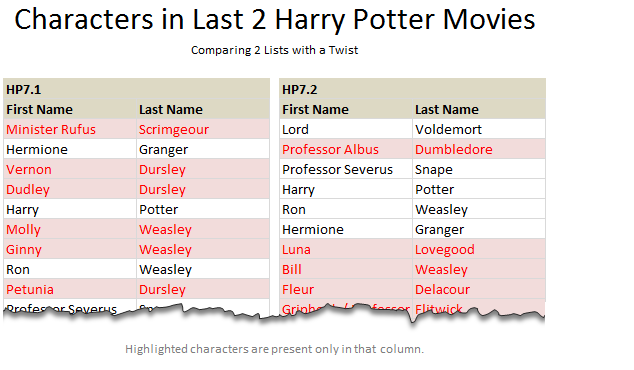
We love to compare. The instinct to compare leaves no one. Even my two year old twins compare their toys with each other (and fight).
It would make Excel hugely popular if Microsoft builds a handy data comparison tool right in to it. Alas, they have customizable ribbon, 3d effects & equation editor…
Since comparison is one of the main uses of Excel, we have written extensively about it here.
But there is always one more interesting comparison problem. Today, I want to share one such problem, based on a comment left by N-Man.
Continue »
Count How Many Times a List of Values Occurs in a Range
(or How Can I Simplify My Formula)
Today in Formula Forensics we look at how to count how many times a range of values occurs within a Range of cells and in the process simplify a very nasty formula.
Continue »
Today we publish what is hopefully the First of many posts by guest author Luke M. it is also the Third post in the Formula Forensics series, which has now moved to a regular and new Thursday slot ?
Luke has taken up Hui’s and 3G’s challenge of explaining how the technique he regularly uses on the Chandoo.org Forums for extracting individual records out of a group.
Today Luke tells us how to extract a list of items from a larger list according to some criteria.
Continue »{ 57 Comments }
Using an Array Formula to Find and Count the Maximum Text Occurrences in a Range
Published on Oct 31, 2011 in Excel Howtos, excel links, Formula Forensics, Huis, Learn Excel, Posts by Hui

Chandoo is off on Holidays and once again thrown me the keys to Chandoo.org.
So this week we’re going to:
- Pull apart an Array Formula and see what’s under the hood;
- Have a look at a technique for quickly developing Custom Number Formats &
- Look at how we can use HTML Codes in posts at Chandoo.org to spice up your questions and answers.
Today is Tarun’s Problem
“I have got multiple names in each row and would like to have what name is repeated maximum number of times and how many times?”
Today we pull apart an answer to this question and see how it works.
Continue »{ 15 Comments }
Compare 2 Lists Visually and Highlight Matches
Published on Oct 27, 2011 in Excel Howtos, Learn Excel
Comparison is one of the most common things we do with Excel. Naturally, there are so many ways to compare 2 lists of data using Excel.
Today, I want to share an interesting comparison problem with you.
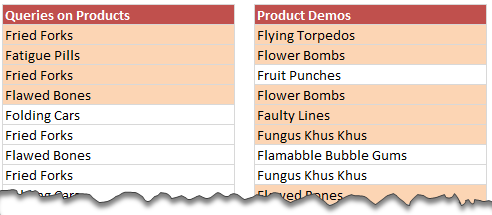
Lets say you run a small shop which sells some highly specialized products. Now, since your products require quite some training before customers can buy them, you keep track of all product queries and arrange demos.
After a hectic week, you are staring at 2 lists. One with product queries, another with product demos. And you want to know whether all the queries are answered with a demo or not.
Continue »{ 12 Comments }
Analyzing Performance of Stocks using Excel [Example]
Published on Sep 21, 2011 in Charts and Graphs
![Analyzing Performance of Stocks using Excel [Example]](https://chandoo.org/wp/wp-content/uploads/2011/09/stock-analysis-in-excel.png)
Last week, we learned how to visualize Suicides vs. Murders data using Interactive charts in Excel. William, one of our readers, took this technique and applied it to Stocks. He emailed me because he has some formula issues with the stock data. Once I solved the problem, I asked him, “Can I share this with […]
Continue »
